---
格式版本: 2
标题: "Add UI to your MCP server – Plugins | OpenAI Developers"
原文链接: "https://developers.openai.com/plugins/build/chatgpt-ui"
发布日期: "2026-09-04"
发布时间校准状态: "found"
发布时间需复核: "否"
发布时间来源: "rule:local:strict_original_body"
发布时间证据: "Published Time: Fri, 04 Sep 2026 04:43:20 GMT"
发布时间校准原因: "规则确认唯一严格发布时间,来源 local:strict_original_body"
发布时间校准置信度: "high"
发布时间候选数量: 4
发布时间严格候选数量: 1
发布时间原页读取状态: "source template page reused from URL open"
发布时间未找到原因: ""
发布时间校准时间: "2026-09-04T16:29:15+08:00"
发布时间仲裁状态: "skipped"
发布时间仲裁尝试次数: 0
发布时间仲裁耗时毫秒: 0
发现时间: "2026-09-04T16:24:00+08:00"
入库时间: "2026-09-04T08:29:15.501Z"
来源平台: "固定入口"
搜索渠道: "fixed_url"
搜索词: "https://developers.openai.com/blog"
匹配关键词:
- "deployment"
- "performance"
- "latency"
- "throughput"
- "AI"
相关厂家:
- "OpenAI"
- "Meta"
- "Microsoft"
- "AWS"
- "Google"
- "Oracle"
相关专家:
[]
内容类型: "网页"
抓取工具: "Jina Reader"
清洗工具: "Jina Reader Markdown + Defuddle/Readability 正文提取"
原始附件:
[]
AI优质: "否"
AI打分: 25
AI分档: "非优质"
AI质检状态: "不通过"
AI打分理由: "正文是OpenAI官方开发者文档,讲解如何为MCP服务器添加可选UI,包括MCP Apps标准、iframe桥接、React组件和结账流程,属于开发教程/运维指南。正文主线与超节点、AI Rack、rack-scale AI或机架级基础设施完全无关,业务准入失败。命中强否决‘教程与运维选型’且主题不相关,最高54分;无新增机架级事实、无商业部署信号,完整性虽高但不能补偿主题缺失。"
AI质检模型: "zj-deepseek-v4-flash"
AI质检时间: "2026-09-04T16:47:38+08:00"
AI主题相关性: 0
AI来源权威性: 15
AI新颖性: 0
AI技术细节: 0
AI商业部署信号: 0
AI完整性: 10
AI评分提示词版本: "v17-精简生产版"
AI评分提示词SHA256: "48fb9777f386026761b4873eaff30807694fb11e9b352d7c69bf2dfde750cc7d"
AI评分知识库版本: "knowledge_base_v1-20260819+runtime.87"
AI评分知识库SHA256: "0cf9900cb3e9d03b3f4c39f45979aac6e2d5c789a68d1b2802c9dab62cd2710e"
AI评分知识库检索词: "[\"OpenAI\",\"https://developers.openai.com/blog\",\"RAS\",\"NPU\",\"Google\",\"Meta\",\"Microsoft\",\"Intel\",\"UI\",\"MCP\",\"URL\",\"GMT\"]"
AI评分知识库命中: "[{\"id\":\"july-correct-0033\",\"title\":\"Microsoft, Alphabet, Meta Pivot from Buy to Build in AI\",\"sourceType\":\"labeled_article\",\"time\":\"2026-07\",\"matchedTerms\":[\"OpenAI\",\"RAS\",\"Google\",\"Meta\",\"Microsoft\",\"UI\",\"URL\"],\"rank\":-18.229700393321},{\"id\":\"july-correct-0001\",\"title\":\"全球首颗2nm GPU来了!苏姿丰甩出“最强AI机架”,CPU性能干翻英伟达 - 智东西\",\"sourceType\":\"labeled_article\",\"time\":\"2026-07\",\"matchedTerms\":[\"OpenAI\",\"RAS\",\"NPU\",\"Meta\"],\"rank\":-12.752907321262027},{\"id\":\"july-correct-0018\",\"title\":\"AMD, Cerebras partner on joint Helios rack-scale AI inference platform\",\"sourceType\":\"labeled_article\",\"time\":\"2026-07\",\"matchedTerms\":[\"OpenAI\",\"RAS\",\"Meta\",\"Microsoft\",\"URL\"],\"rank\":-12.180948954382538},{\"id\":\"july-correct-0015\",\"title\":\"AMD to join the optical interconnect party with 2027 Instinct GPUs\",\"sourceType\":\"labeled_article\",\"time\":\"2026-07\",\"matchedTerms\":[\"OpenAI\",\"Meta\",\"Microsoft\",\"URL\"],\"rank\":-12.059703544606952},{\"id\":\"july-correct-0034\",\"title\":\"AMD Fires Back at Nvidia with Helios AI System, Epyc CPUs\",\"sourceType\":\"labeled_article\",\"time\":\"2026-07\",\"matchedTerms\":[\"RAS\",\"Meta\",\"Microsoft\",\"Intel\",\"UI\",\"URL\"],\"rank\":-10.135607013569485}]"
采集批次: "2026年9月4日15点53分07秒"
采集批次ID: "20260904-155307-58ad1755"
去重键: "https://developers.openai.com/plugins/build/chatgpt-ui"
---
Title: Add UI to your MCP server – Plugins | OpenAI Developers
URL Source: https://developers.openai.com/plugins/build/chatgpt-ui
Published Time: Fri, 04 Sep 2026 04:43:20 GMT
Markdown Content:
For the complete documentation index, see [llms.txt](https://developers.openai.com/llms.txt). Markdown versions of documentation pages are available by appending `.md` to the page URL.
[ChatGPT](https://developers.openai.com/)
[Home](https://developers.openai.com/)
[API](https://developers.openai.com/api/docs)
[Codex](https://learn.chatgpt.com/docs)
[Docs Guides, concepts, and product docs for Codex](https://learn.chatgpt.com/docs)[Use cases Example workflows and tasks teams can take on with ChatGPT or Codex](https://learn.chatgpt.com/use-cases)
[Docs](https://developers.openai.com/codex)
[Use cases](https://developers.openai.com/codex/use-cases)
[Training](https://developers.openai.com/training)
[Resources](https://developers.openai.com/codex/resources)
[ChatGPT](https://developers.openai.com/chatgpt)
[Plugins Extend ChatGPT and Codex](https://developers.openai.com/plugins)[Workspace Agents Trigger published ChatGPT workspace agents](https://developers.openai.com/workspace-agents)[Commerce Build commerce flows in ChatGPT](https://developers.openai.com/commerce)[Ads Publish and measure ads in ChatGPT](https://developers.openai.com/ads)
[Resources](https://developers.openai.com/learn)
[Showcase Demo apps to get inspired](https://developers.openai.com/showcase)[Blog Learnings and experiences from developers](https://developers.openai.com/blog)[Cookbook Notebook examples for building with OpenAI models](https://developers.openai.com/cookbook)[Learn Docs, videos, and demo apps for building with OpenAI](https://developers.openai.com/learn)[Community Programs, meetups, and support for builders](https://developers.openai.com/community)
Start searching
[API Dashboard](https://platform.openai.com/login)
[Try ChatGPT](https://chatgpt.com/)
## Search the ChatGPT docs
Search docs
### Suggested
responses create reasoning_effort realtime prompt caching
Primary navigation
API Codex ChatGPT Docs Use cases Training Resources Resources
Search docs
### Suggested
responses create reasoning_effort realtime prompt caching
Overview Models Agents Tools Voice & Audio Production API reference
Docs Overview
* [Home](https://developers.openai.com/api/docs)
### Get started
* [Quickstart](https://developers.openai.com/api/docs/quickstart)
* [Using GPT-6 Astra](https://developers.openai.com/api/docs/guides/latest-model)
* [Key concepts](https://developers.openai.com/api/docs/concepts)
### Core concepts
* [Responses API](https://developers.openai.com/api/docs/guides/migrate-to-responses)
* [Conversation state](https://developers.openai.com/api/docs/guides/conversation-state)
* [Background mode](https://developers.openai.com/api/docs/guides/background)
* [Streaming](https://developers.openai.com/api/docs/guides/streaming-responses)
* [WebSocket mode](https://developers.openai.com/api/docs/guides/websocket-mode)
* [Mid-turn steering](https://developers.openai.com/api/docs/guides/steering)
* [Multi-agent](https://developers.openai.com/api/docs/guides/responses-multi-agent)
* [Webhooks](https://developers.openai.com/api/docs/guides/webhooks)
* [File inputs](https://developers.openai.com/api/docs/guides/file-inputs)
* [Compaction](https://developers.openai.com/api/docs/guides/compaction)
* [Counting tokens](https://developers.openai.com/api/docs/guides/token-counting)
### SDKs and CLI
* [OpenAI SDK](https://developers.openai.com/api/docs/libraries)
* [OpenAI CLI](https://developers.openai.com/api/docs/libraries/openai-cli)
### Resources
* [Changelog](https://developers.openai.com/api/docs/changelog)
* [Deprecations](https://developers.openai.com/api/docs/deprecations)
* [Supported countries](https://developers.openai.com/api/docs/supported-countries)
* [OpenAI Crawlers](https://developers.openai.com/api/docs/bots)
* [Terms and policies](https://openai.com/policies)
### Legacy APIs
*
Agent Builder
* [Overview](https://developers.openai.com/api/docs/guides/agent-builder)
* [Migration guide](https://developers.openai.com/api/docs/guides/agent-builder/migrate-from-agent-builder)
* [Node reference](https://developers.openai.com/api/docs/guides/node-reference)
* [Safety in building agents](https://developers.openai.com/api/docs/guides/agent-builder-safety)
*
Evals
* [Getting started](https://developers.openai.com/api/docs/guides/evaluation-getting-started)
* [Working with evals](https://developers.openai.com/api/docs/guides/evals)
* [Prompt optimizer](https://developers.openai.com/api/docs/guides/prompt-optimizer)
* [External models](https://developers.openai.com/api/docs/guides/external-models)
* [Best practices](https://developers.openai.com/api/docs/guides/evaluation-best-practices)
* [Graders](https://developers.openai.com/api/docs/guides/graders)
*
Fine-tuning
* [Optimization cycle](https://developers.openai.com/api/docs/guides/model-optimization)
* [Supervised fine-tuning](https://developers.openai.com/api/docs/guides/supervised-fine-tuning)
* [Vision fine-tuning](https://developers.openai.com/api/docs/guides/vision-fine-tuning)
* [Direct preference optimization](https://developers.openai.com/api/docs/guides/direct-preference-optimization)
* [Reinforcement fine-tuning](https://developers.openai.com/api/docs/guides/reinforcement-fine-tuning)
* [RFT use cases](https://developers.openai.com/api/docs/guides/rft-use-cases)
* [Best practices](https://developers.openai.com/api/docs/guides/fine-tuning-best-practices)
*
Assistants API
* [Migration guide](https://developers.openai.com/api/docs/assistants/migration)
* [Model catalog](https://developers.openai.com/api/docs/models)
### Choose a model
* [Pricing](https://developers.openai.com/api/docs/pricing)
* [Model selection](https://developers.openai.com/api/docs/guides/model-selection)
### Text and code
* [Text generation](https://developers.openai.com/api/docs/guides/text)
* [Code generation](https://developers.openai.com/api/docs/guides/code-generation)
* [Structured output](https://developers.openai.com/api/docs/guides/structured-outputs)
### Prompting
* [Overview](https://developers.openai.com/api/docs/guides/prompting)
* [Prompt engineering](https://developers.openai.com/api/docs/guides/prompt-engineering)
* [Citation formatting](https://developers.openai.com/api/docs/guides/citation-formatting)
* [Migration guide](https://developers.openai.com/api/docs/guides/prompting/migrate-from-prompt-object)
* [Prompt generation](https://developers.openai.com/api/docs/guides/prompt-generation)
* [Frontend prompting](https://developers.openai.com/api/docs/guides/frontend-prompt)
### Reasoning
* [Reasoning models](https://developers.openai.com/api/docs/guides/reasoning)
* [Reasoning best practices](https://developers.openai.com/api/docs/guides/reasoning-best-practices)
### Images and video
*
[Images and vision](https://developers.openai.com/api/docs/guides/images-vision)
* [Image input cost calculator](https://developers.openai.com/api/docs/guides/image-cost-calculator)
* [Image generation](https://developers.openai.com/api/docs/guides/image-generation)
* [Video generation](https://developers.openai.com/api/docs/guides/video-generation)
### Realtime and audio
* [Audio and speech](https://developers.openai.com/api/docs/guides/audio)
* [Overview](https://developers.openai.com/api/docs/guides/realtime)
* [Voice agents](https://developers.openai.com/api/docs/guides/voice-agents)
### Specialized models
* [Deep research](https://developers.openai.com/api/docs/guides/deep-research)
* [Embeddings](https://developers.openai.com/api/docs/guides/embeddings)
* [Moderation](https://developers.openai.com/api/docs/guides/moderation)
* [Overview](https://developers.openai.com/api/docs/guides/agents)
### Agents SDK
* [Quickstart](https://developers.openai.com/api/docs/guides/agents/quickstart)
* [Agent definitions](https://developers.openai.com/api/docs/guides/agents/define-agents)
* [Models and providers](https://developers.openai.com/api/docs/guides/agents/models)
* [Running agents](https://developers.openai.com/api/docs/guides/agents/running-agents)
* [Sandbox agents](https://developers.openai.com/api/docs/guides/agents/sandboxes)
* [Orchestration](https://developers.openai.com/api/docs/guides/agents/orchestration)
* [Guardrails](https://developers.openai.com/api/docs/guides/agents/guardrails-approvals)
* [Results and state](https://developers.openai.com/api/docs/guides/agents/results)
* [Integrations and observability](https://developers.openai.com/api/docs/guides/agents/integrations-observability)
* [Evaluate agent workflows](https://developers.openai.com/api/docs/guides/agent-evals)
### ChatKit
* [Overview](https://developers.openai.com/api/docs/guides/chatkit)
* [Customize](https://developers.openai.com/api/docs/guides/chatkit-themes)
* [Widgets](https://developers.openai.com/api/docs/guides/chatkit-widgets)
* [Actions](https://developers.openai.com/api/docs/guides/chatkit-actions)
* [Advanced integrations](https://developers.openai.com/api/docs/guides/custom-chatkit)
* [Overview](https://developers.openai.com/api/docs/guides/tools)
* [Function calling](https://developers.openai.com/api/docs/guides/function-calling)
### Search and retrieval
* [Web search](https://developers.openai.com/api/docs/guides/tools-web-search)
* [File search](https://developers.openai.com/api/docs/guides/tools-file-search)
* [Retrieval](https://developers.openai.com/api/docs/guides/retrieval)
### Connect tools and data
* [MCP and Connectors](https://developers.openai.com/api/docs/guides/tools-connectors-mcp)
* [Secure MCP Tunnel](https://developers.openai.com/api/docs/guides/secure-mcp-tunnels)
### Build tool workflows
* [Skills](https://developers.openai.com/api/docs/guides/tools-skills)
* [Tool search](https://developers.openai.com/api/docs/guides/tools-tool-search)
* [Programmatic tool calling](https://developers.openai.com/api/docs/guides/tools-programmatic-tool-calling)
* [Async tool calling](https://developers.openai.com/api/docs/guides/async-tool-calling)
### Computer and code
* [Shell](https://developers.openai.com/api/docs/guides/tools-shell)
* [Computer use](https://developers.openai.com/api/docs/guides/tools-computer-use)
* [Apply Patch](https://developers.openai.com/api/docs/guides/tools-apply-patch)
* [Local shell](https://developers.openai.com/api/docs/guides/tools-local-shell)
* [Code interpreter](https://developers.openai.com/api/docs/guides/tools-code-interpreter)
### Media
* [Image generation](https://developers.openai.com/api/docs/guides/tools-image-generation)
* [Overview](https://developers.openai.com/api/docs/guides/realtime)
### Get started
* [Voice agents](https://developers.openai.com/api/docs/guides/voice-agents)
* [Live translation](https://developers.openai.com/api/docs/guides/realtime-translation)
* [Realtime prompting guide](https://developers.openai.com/api/docs/guides/realtime-models-prompting)
### Audio
* [Audio and speech](https://developers.openai.com/api/docs/guides/audio)
* [Transcription](https://developers.openai.com/api/docs/guides/transcription)
* [File transcription](https://developers.openai.com/api/docs/guides/speech-to-text)
* [Realtime transcription](https://developers.openai.com/api/docs/guides/realtime-transcription)
* [Speech generation](https://developers.openai.com/api/docs/guides/text-to-speech)
### Connection methods
* [WebRTC](https://developers.openai.com/api/docs/guides/realtime-webrtc)
* [WebSocket](https://developers.openai.com/api/docs/guides/realtime-websocket)
* [SIP](https://developers.openai.com/api/docs/guides/realtime-sip)
### Sessions and operations
* [Managing conversations](https://developers.openai.com/api/docs/guides/realtime-conversations)
* [Voice activity detection](https://developers.openai.com/api/docs/guides/realtime-vad)
* [Realtime with tools](https://developers.openai.com/api/docs/guides/realtime-mcp)
* [Webhooks and server-side controls](https://developers.openai.com/api/docs/guides/realtime-server-controls)
* [Managing costs](https://developers.openai.com/api/docs/guides/realtime-costs)
### Go live
* [Production best practices](https://developers.openai.com/api/docs/guides/production-best-practices)
* [Deployment checklist](https://developers.openai.com/api/docs/guides/deployment-checklist)
### Performance and quality
* [Latency optimization](https://developers.openai.com/api/docs/guides/latency-optimization)
* [Predicted Outputs](https://developers.openai.com/api/docs/guides/predicted-outputs)
* [Fast mode](https://developers.openai.com/api/docs/guides/fast-mode)
* [Accuracy optimization](https://developers.openai.com/api/docs/guides/optimizing-llm-accuracy)
### Cost and throughput
* [Cost optimization](https://developers.openai.com/api/docs/guides/cost-optimization)
* [Prompt caching](https://developers.openai.com/api/docs/guides/prompt-caching)
* [Batch](https://developers.openai.com/api/docs/guides/batch)
* [Flex processing](https://developers.openai.com/api/docs/guides/flex-processing)
### Safety and governance
* [Safety best practices](https://developers.openai.com/api/docs/guides/safety-best-practices)
* [Red teaming](https://developers.openai.com/api/docs/guides/red-teaming)
*
Safety checks
* [Safety classifiers](https://developers.openai.com/api/docs/guides/safety-checks)
* [Cybersecurity checks](https://developers.openai.com/api/docs/guides/safety-checks/cybersecurity)
* [Misalignment monitoring](https://developers.openai.com/api/docs/guides/safety-checks/misalignment-monitoring)
* [Under-18 guidance](https://developers.openai.com/api/docs/guides/safety-checks/under-18-api-guidance)
* [CSAM guidance](https://developers.openai.com/api/docs/guides/csam-guidance)
* [Content provenance](https://developers.openai.com/api/docs/guides/content-provenance)
* [Your data](https://developers.openai.com/api/docs/guides/your-data)
* [Permissions](https://developers.openai.com/api/docs/guides/rbac)
### Infrastructure and access
*
[Terraform provider](https://developers.openai.com/api/docs/guides/terraform)
* [Overview](https://developers.openai.com/api/docs/guides/terraform)
* [Projects and access](https://developers.openai.com/api/docs/guides/terraform/projects-and-access)
* [Service accounts](https://developers.openai.com/api/docs/guides/terraform/service-accounts)
* [Rate limits and spend](https://developers.openai.com/api/docs/guides/terraform/rate-limits-and-spend)
* [Model, tool, and data controls](https://developers.openai.com/api/docs/guides/terraform/project-controls)
* [Import and reconciliation](https://developers.openai.com/api/docs/guides/terraform/import-and-reconcile)
* [Private Link](https://developers.openai.com/api/docs/guides/private-link)
* [IP allowlist](https://developers.openai.com/api/docs/guides/ip-allowlist)
* [Mutual TLS](https://developers.openai.com/api/docs/guides/mutual-tls)
*
[Workload identity federation](https://developers.openai.com/api/docs/guides/workload-identity-federation)
* [Codex setup](https://developers.openai.com/codex/enterprise/workload-identity)
* [Federation rules](https://developers.openai.com/api/docs/guides/workload-identity-federation/federation-rules)
* [Admin API](https://developers.openai.com/api/docs/guides/workload-identity-federation/admin-api)
* [X.509 certificates](https://developers.openai.com/api/docs/guides/workload-identity-federation/x509)
* [Kubernetes](https://developers.openai.com/api/docs/guides/workload-identity-federation/kubernetes)
* [AWS](https://developers.openai.com/api/docs/guides/workload-identity-federation/aws)
* [Microsoft Azure](https://developers.openai.com/api/docs/guides/workload-identity-federation/microsoft-azure)
* [Google Cloud](https://developers.openai.com/api/docs/guides/workload-identity-federation/google-cloud)
* [Oracle Cloud Infrastructure](https://developers.openai.com/api/docs/guides/workload-identity-federation/oracle-cloud)
* [GitHub Actions](https://developers.openai.com/api/docs/guides/workload-identity-federation/github-actions)
* [SPIFFE](https://developers.openai.com/api/docs/guides/workload-identity-federation/spiffe)
* [IP egress ranges](https://developers.openai.com/api/docs/guides/ip-addresses)
* [Amazon Bedrock](https://developers.openai.com/api/docs/guides/amazon-bedrock)
### Operations
* [Rate limits](https://developers.openai.com/api/docs/guides/rate-limits)
* [Spend limits](https://developers.openai.com/api/docs/guides/spend-limits)
* [Admin APIs](https://developers.openai.com/api/docs/guides/admin-apis)
* [Error codes](https://developers.openai.com/api/docs/guides/error-codes)
[Docs](https://learn.chatgpt.com/docs)[Use cases](https://learn.chatgpt.com/use-cases)
Docs Docs
Plugins Workspace Agents Commerce Ads
Docs Plugins
* [Home](https://developers.openai.com/plugins)
* [Quickstart](https://developers.openai.com/plugins/quickstart)
### Core concepts
* [Plugin architecture](https://developers.openai.com/plugins/concepts/plugins)
* [Skills](https://developers.openai.com/plugins/concepts/skills)
* [MCP server](https://developers.openai.com/plugins/concepts/mcp-server)
### Plan
* [Brainstorm use cases](https://developers.openai.com/plugins/plan/use-case)
* [Define tools](https://developers.openai.com/plugins/plan/tools)
### Build
* [Build an MCP server](https://developers.openai.com/plugins/build/mcp-server)
* [Add UI to your MCP server (optional)](https://developers.openai.com/plugins/build/chatgpt-ui)
* [Authenticate users](https://developers.openai.com/plugins/build/auth)
* [Build skills](https://developers.openai.com/plugins/build/skills)
* [Package your plugin](https://developers.openai.com/plugins/build/plugins)
* [Examples](https://developers.openai.com/plugins/build/examples)
### Test and publish
* [Connect and test your plugin](https://developers.openai.com/plugins/deploy/connect-chatgpt)
* [Submit and publish](https://developers.openai.com/plugins/deploy/submission)
* [Submission error reference](https://developers.openai.com/plugins/deploy/submission-errors)
### Conversion specs
* [Restaurant reservation spec](https://developers.openai.com/plugins/guides/restaurant-reservation-conversion-spec)
* [Get Quote spec](https://developers.openai.com/plugins/guides/local-services-request-quote-conversion-spec)
* [Product checkout spec](https://developers.openai.com/plugins/guides/product-checkout-conversion-spec)
### Guides
* [UI guidelines](https://developers.openai.com/plugins/concepts/ui-guidelines)
* [Optimize Metadata](https://developers.openai.com/plugins/guides/optimize-metadata)
* [Submit a Claude Code plugin](https://developers.openai.com/plugins/guides/submit-claude-plugin)
* [Security & Privacy](https://developers.openai.com/plugins/guides/security-privacy)
* [Troubleshooting](https://developers.openai.com/plugins/deploy/troubleshooting)
### Resources
* [Changelog](https://developers.openai.com/plugins/changelog)
* [Plugin guidelines](https://developers.openai.com/plugins/app-guidelines)
* [MCP server review requirements](https://developers.openai.com/plugins/deploy/app-review)
* [Plugin UI reference](https://developers.openai.com/plugins/reference)
* [Checkout API reference](https://developers.openai.com/plugins/build/monetization)
* [Home](https://developers.openai.com/workspace-agents)
### Get started
* [Trigger workspace agent runs](https://developers.openai.com/workspace-agents/trigger-runs)
* [Authenticate with Workspace Agent access tokens](https://developers.openai.com/workspace-agents/authentication)
* [Home](https://developers.openai.com/commerce)
### Guides
* [Get started](https://developers.openai.com/commerce/guides/get-started)
* [Best practices](https://developers.openai.com/commerce/guides/best-practices)
### File Upload
* [Overview](https://developers.openai.com/commerce/specs/file-upload/overview)
* [Products](https://developers.openai.com/commerce/specs/file-upload/products)
### API
* [Overview](https://developers.openai.com/commerce/specs/api/overview)
* [Feeds](https://developers.openai.com/commerce/specs/api/feeds)
* [Products](https://developers.openai.com/commerce/specs/api/products)
* [Promotions](https://developers.openai.com/commerce/specs/api/promotions)
* [Ads Overview](https://developers.openai.com/ads)
### Measurement
* [Measurement Pixel](https://developers.openai.com/ads/measurement-pixel)
* [Multiple Pixels (Advanced)](https://developers.openai.com/ads/multiple-pixels)
* [Image Tag](https://developers.openai.com/ads/image-tag)
* [Conversions API](https://developers.openai.com/ads/conversions-api)
* [Supported Events](https://developers.openai.com/ads/supported-events)
### Advertiser API
* [Overview](https://developers.openai.com/ads/api-overview)
* [API Partner Setup](https://developers.openai.com/ads/api-partner-setup)
* [Quickstart](https://developers.openai.com/ads/api-quickstart)
* [Bulk API](https://developers.openai.com/ads/bulk-api)
* [Product Feeds](https://developers.openai.com/ads/product-feeds)
* [Delta Feeds API](https://developers.openai.com/ads/delta-feeds)
* [Campaign Targeting](https://developers.openai.com/ads/campaign-targeting)
* [Conversion-Optimized Campaigns](https://developers.openai.com/ads/conversion-optimized-campaigns)
* [Custom Audiences](https://developers.openai.com/ads/custom-audiences)
### API Reference
* [Authentication](https://developers.openai.com/ads/api-reference/authentication)
* [Ad Account](https://developers.openai.com/ads/api-reference/ad-account)
* [Campaigns](https://developers.openai.com/ads/api-reference/campaigns)
* [Ad Groups](https://developers.openai.com/ads/api-reference/ad-groups)
* [Ads](https://developers.openai.com/ads/api-reference/ads)
* [Insights](https://developers.openai.com/ads/api-reference/insights)
* [Files](https://developers.openai.com/ads/api-reference/files)
* [Conversion Setup](https://developers.openai.com/ads/api-reference/conversion-setup)
Overview Features Configuration Developers Security Administration Use Cases Resources
Docs Overview
* [Home](https://developers.openai.com/codex)
### Get started
* [Quickstart](https://developers.openai.com/codex/quickstart)
* [Use ChatGPT](https://developers.openai.com/codex/use-chatgpt)
* [Get started with Work](https://developers.openai.com/codex/get-started-with-work)
* [Import from another agent](https://developers.openai.com/codex/import)
### Foundations
* [Prompting](https://developers.openai.com/codex/prompting)
* [Personalize ChatGPT](https://developers.openai.com/codex/personalize)
* [Skills & Plugins](https://developers.openai.com/codex/skills-and-plugins)
* [Permissions](https://developers.openai.com/codex/permission-modes)
### Explore
* [What's new](https://developers.openai.com/codex/whats-new)
* [Models](https://developers.openai.com/codex/models)
* [Pricing](https://developers.openai.com/codex/pricing)
* [Glossary](https://developers.openai.com/codex/glossary)
### Available on
* [ChatGPT desktop app](https://developers.openai.com/codex/app)
* [Remote](https://developers.openai.com/codex/remote)
* [ChatGPT on the web](https://developers.openai.com/codex/web)
* [Codex CLI](https://developers.openai.com/codex/cli)
* [Codex IDE extension](https://developers.openai.com/codex/ide)
* [Codex cloud](https://developers.openai.com/codex/cloud)
### Releases
* [Changelog](https://developers.openai.com/codex/changelog)
* [Feature Maturity](https://developers.openai.com/codex/feature-maturity)
* [Open Source](https://developers.openai.com/codex/open-source)
* [Overview](https://developers.openai.com/codex/features)
### Workflows
* [Projects and chats](https://developers.openai.com/codex/projects)
* [Sites](https://developers.openai.com/codex/sites)
* [Visualizations](https://developers.openai.com/codex/visualizations)
* [Scheduled tasks](https://developers.openai.com/codex/automations)
* [Long-running work](https://developers.openai.com/codex/long-running-work)
* [Notifications](https://developers.openai.com/codex/notifications)
* [Pets](https://developers.openai.com/codex/pets)
* [Codex Micro](https://developers.openai.com/codex/features/codex-micro)
### Capabilities
* [Browser](https://developers.openai.com/codex/browser)
* [Computer use](https://developers.openai.com/codex/computer-use)
* [Voice](https://developers.openai.com/codex/features/voice)
* [Plugins](https://developers.openai.com/codex/plugins)
* [Web search](https://developers.openai.com/codex/web-search)
* [Image generation](https://developers.openai.com/codex/image-generation)
* [Image inputs](https://developers.openai.com/codex/image-inputs)
* [Appshots](https://developers.openai.com/codex/appshots)
* [Browser extension](https://developers.openai.com/codex/chrome-extension)
* [Work with files](https://developers.openai.com/codex/artifacts-viewer)
### Reference
* [Commands](https://developers.openai.com/codex/reference/commands)
* [Slash commands](https://developers.openai.com/codex/reference/slash-commands)
* [Settings](https://developers.openai.com/codex/reference/settings)
* [Troubleshooting](https://developers.openai.com/codex/reference/troubleshooting)
* [Overview](https://developers.openai.com/codex/configuration)
### Customization
* [Overview](https://developers.openai.com/codex/customization/overview)
* [Memories](https://developers.openai.com/codex/customization/memories)
* [Computer History](https://developers.openai.com/codex/customization/computer-history)
### Config file
* [Config Basics](https://developers.openai.com/codex/config-file/config-basic)
* [Advanced Config](https://developers.openai.com/codex/config-file/config-advanced)
* [Config Reference](https://developers.openai.com/codex/config-file/config-reference)
* [Environment Variables](https://developers.openai.com/codex/config-file/environment-variables)
* [Sample Config](https://developers.openai.com/codex/config-file/config-sample)
### Agent configuration
* [AGENTS.md](https://developers.openai.com/codex/agent-configuration/agents-md)
* [Subagents](https://developers.openai.com/codex/agent-configuration/subagents)
* [Speed](https://developers.openai.com/codex/agent-configuration/speed)
* [Rules](https://developers.openai.com/codex/agent-configuration/rules)
### Extend ChatGPT and Codex
* [Record & Replay](https://developers.openai.com/codex/extend/record-and-replay)
* [MCP](https://developers.openai.com/codex/extend/mcp)
### Linux
* [Desktop app](https://developers.openai.com/codex/linux/linux-app)
### Windows
* [Desktop app](https://developers.openai.com/codex/windows/windows-app)
* [Windows sandbox](https://developers.openai.com/codex/windows/windows-sandbox)
* [WSL](https://developers.openai.com/codex/windows/wsl)
* [Overview](https://developers.openai.com/codex/developers)
### Development workflows
* [Code review](https://developers.openai.com/codex/code-review)
* [Integrated terminal](https://developers.openai.com/codex/integrated-terminal)
### Extend and automate
* [Build skills](https://developers.openai.com/codex/build-skills)
* [Build plugins](https://developers.openai.com/codex/build-plugins)
* [Site tools (WebMCP)](https://developers.openai.com/codex/webmcp)
* [Hooks](https://developers.openai.com/codex/hooks)
### Environments
* [Modes](https://developers.openai.com/codex/environments/modes)
* [Local environments](https://developers.openai.com/codex/environments/local-environment)
* [Cloud environment](https://developers.openai.com/codex/environments/cloud-environment)
* [Git worktrees](https://developers.openai.com/codex/environments/git-worktrees)
### Build with Codex
* [Codex SDK](https://developers.openai.com/codex/codex-sdk)
* [App Server](https://developers.openai.com/codex/app-server)
* [MCP Server](https://developers.openai.com/codex/mcp-server)
* [GitHub Action](https://developers.openai.com/codex/github-action)
* [Non-interactive mode](https://developers.openai.com/codex/non-interactive-mode)
### Third-party integrations
* [GitHub](https://developers.openai.com/codex/third-party/github)
* [GitLab (Beta)](https://developers.openai.com/codex/third-party/gitlab)
* [Slack](https://developers.openai.com/codex/third-party/slack)
* [Linear](https://developers.openai.com/codex/third-party/linear)
### Reference
* [CLI customization](https://developers.openai.com/codex/cli-customization)
* [Developer commands](https://developers.openai.com/codex/developer-commands)
* [Developer settings](https://developers.openai.com/codex/developer-settings)
* [Overview](https://developers.openai.com/codex/security-administration)
### Permissions
* [Profiles](https://developers.openai.com/codex/permissions)
* [Sandboxing](https://developers.openai.com/codex/sandboxing)
* [Auto-review](https://developers.openai.com/codex/sandboxing/auto-review)
* [Agent approvals & security](https://developers.openai.com/codex/agent-approvals-security)
* [Internet access](https://developers.openai.com/codex/cloud/internet-access)
### Codex Security
* [Overview](https://developers.openai.com/codex/security)
*
Codex Security plugin
* [Quickstart](https://developers.openai.com/codex/security/plugin)
* [Run a security scan](https://developers.openai.com/codex/security/plugin/scans)
* [Run a deep scan](https://developers.openai.com/codex/security/plugin/deep-scans)
* [Review code changes](https://developers.openai.com/codex/security/plugin/code-changes)
* [Use the Security workbench](https://developers.openai.com/codex/security/plugin/workbench)
* [Triage a backlog](https://developers.openai.com/codex/security/plugin/triage-backlog)
* [Fix findings](https://developers.openai.com/codex/security/plugin/fix-findings)
* [Propose security hardening](https://developers.openai.com/codex/security/plugin/security-hardening)
* [Write vulnerability reports](https://developers.openai.com/codex/security/plugin/vulnerability-reports)
* [Export and track findings](https://developers.openai.com/codex/security/plugin/export-findings)
* [Changelog](https://developers.openai.com/codex/security/plugin/changelog)
*
Codex Security CLI
* [Quickstart](https://developers.openai.com/codex/security/cli)
* [Run bulk scans](https://developers.openai.com/codex/security/cli/bulk-scans)
* [Run scans in CI](https://developers.openai.com/codex/security/cli/ci)
* [GitLab CI/CD](https://developers.openai.com/codex/security/cli/ci/gitlab)
* [Reference](https://developers.openai.com/codex/security/cli/reference)
* [FAQ](https://developers.openai.com/codex/security/cli/faq)
* [TypeScript SDK](https://developers.openai.com/codex/security/sdk)
*
Codex Security cloud
* [Setup](https://developers.openai.com/codex/security/setup)
* [Security Review](https://developers.openai.com/codex/security/security-review)
* [Improving the threat model](https://developers.openai.com/codex/security/threat-model)
* [FAQ](https://developers.openai.com/codex/security/faq)
### Cyber safety
* [Models & Trusted Access](https://developers.openai.com/codex/cyber-safety)
* [Recommended configuration](https://developers.openai.com/codex/cyber-safety/recommended-configuration)
* [Overview](https://developers.openai.com/codex/administration)
### Getting started
* [Admin rollout guide](https://developers.openai.com/codex/enterprise/admin-setup)
### ChatGPT Work
* [ChatGPT Work Overview](https://developers.openai.com/codex/enterprise/chatgpt-work-overview)
* [ChatGPT Work cloud security](https://developers.openai.com/codex/enterprise/chatgpt-work-cloud-security)
* [ChatGPT Work local security](https://developers.openai.com/codex/enterprise/chatgpt-work-local-security)
* [ChatGPT Work admin FAQ](https://developers.openai.com/codex/enterprise/work-admin-faq)
* [ChatGPT Work: usage and cost](https://developers.openai.com/codex/enterprise/chatgpt-work-usage-and-cost)
### Identity and authentication
* [Authentication overview](https://developers.openai.com/codex/auth)
* [Workload identity](https://developers.openai.com/codex/enterprise/workload-identity)
* [Personal Access Tokens](https://developers.openai.com/codex/enterprise/access-tokens)
* [Service accounts](https://developers.openai.com/codex/enterprise/service-accounts)
### Workspace access, policy, and models
* [Groups and provisioning](https://developers.openai.com/codex/enterprise/groups-and-provisioning)
* [User lifecycle management](https://developers.openai.com/codex/enterprise/user-lifecycle)
* [Roles and workspace permissions](https://developers.openai.com/codex/enterprise/roles-and-workspace-permissions)
* [GPTs and Sharing](https://developers.openai.com/codex/enterprise/gpts-and-sharing)
* [Managed configuration](https://developers.openai.com/codex/enterprise/managed-configuration)
* [Prisma AIRS](https://developers.openai.com/codex/enterprise/prisma-airs)
* [HIPAA configuration](https://developers.openai.com/codex/hipaa-configuration)
* [Workspace model availability](https://developers.openai.com/codex/enterprise/workspace-model-availability)
### Plugin and connector controls
* [Plugin controls](https://developers.openai.com/codex/enterprise/apps-and-connectors)
* [Plugin management](https://developers.openai.com/codex/enterprise/plugin-management)
* [Skill controls](https://developers.openai.com/codex/enterprise/skills)
### Usage, governance, and compliance
* [Governance](https://developers.openai.com/codex/enterprise/governance)
* [Admin plugin](https://developers.openai.com/codex/enterprise/admin-plugin)
* [Workspace analytics](https://developers.openai.com/codex/enterprise/workspace-analytics)
* [Analytics API](https://developers.openai.com/codex/enterprise/analytics-api)
* [Compliance API and audit events](https://developers.openai.com/codex/enterprise/compliance-api)
### Deployment and model providers
* [Manage app updates](https://developers.openai.com/codex/enterprise/manage-app-updates)
* [Windows app deployment](https://developers.openai.com/codex/enterprise/windows-deployment)
* [Remote connections](https://developers.openai.com/codex/remote-connections)
* [Amazon Bedrock](https://developers.openai.com/codex/amazon-bedrock)
* [Explore use cases](https://developers.openai.com/codex/use-cases)
* [Collections](https://developers.openai.com/codex/use-cases/collections)
* [Home](https://developers.openai.com/codex/resources)
* [Videos](https://developers.openai.com/codex/videos)
* [Showcase](https://developers.openai.com/showcase)
* [OpenAI Academy](https://openai.com/academy/)
* [Online trainings](https://academy.openai.com/home/events)
### Community
* [Codex Ambassadors](https://developers.openai.com/community/codex-ambassadors)
* [Codex for Students](https://developers.openai.com/community/students)
* [Codex for Open Source](https://developers.openai.com/community/codex-for-oss)
* [Meetups](https://developers.openai.com/community/meetups)
### Blog
* [Company blog](https://openai.com/news/)
* [Developer blog](https://developers.openai.com/blog)
* [Explore use cases](https://developers.openai.com/codex/use-cases)
* [Collections](https://developers.openai.com/codex/use-cases/collections)
* [Home](https://developers.openai.com/codex/resources)
* [Videos](https://developers.openai.com/codex/videos)
* [Showcase](https://developers.openai.com/showcase)
* [OpenAI Academy](https://openai.com/academy/)
* [Online trainings](https://academy.openai.com/home/events)
### Community
* [Codex Ambassadors](https://developers.openai.com/community/codex-ambassadors)
* [Codex for Students](https://developers.openai.com/community/students)
* [Codex for Open Source](https://developers.openai.com/community/codex-for-oss)
* [Meetups](https://developers.openai.com/community/meetups)
### Blog
* [Company blog](https://openai.com/news/)
* [Developer blog](https://developers.openai.com/blog)
[Showcase](https://developers.openai.com/showcase) Blog Cookbook Learn Community
Docs Select...
* [All posts](https://developers.openai.com/blog)
### Recent
* [Meet Rosalind Workbench: Empowering every scientist to be their own research team](https://developers.openai.com/blog/rosalind-workbench)
* [Automating repetitive work at OpenAI with Codex](https://developers.openai.com/blog/automating-repetitive-work-at-openai-with-codex)
* [Meet the winners of OpenAI Build Week](https://developers.openai.com/blog/build-week-winners)
* [Scaling cyber defenders with Daybreak](https://developers.openai.com/blog/scaling-cyber-defenders-with-daybreak)
* [Codex as a platform: build on the open agent harness](https://developers.openai.com/blog/codex-as-a-platform)
### Topics
* [General](https://developers.openai.com/blog/topic/general)
* [API](https://developers.openai.com/blog/topic/api)
* [Apps SDK](https://developers.openai.com/blog/topic/apps-sdk)
* [Audio](https://developers.openai.com/blog/topic/audio)
* [Codex](https://developers.openai.com/blog/topic/codex)
* [Life sciences](https://developers.openai.com/blog/topic/life-sciences)
* [Home](https://developers.openai.com/cookbook)
### Topics
* [Agents](https://developers.openai.com/cookbook/topic/agents)
* [Evals](https://developers.openai.com/cookbook/topic/evals)
* [Multimodal](https://developers.openai.com/cookbook/topic/multimodal)
* [Text](https://developers.openai.com/cookbook/topic/text)
* [Guardrails](https://developers.openai.com/cookbook/topic/guardrails)
* [Optimization](https://developers.openai.com/cookbook/topic/optimization)
* [ChatGPT](https://developers.openai.com/cookbook/topic/chatgpt)
* [Codex](https://developers.openai.com/cookbook/topic/codex)
* [gpt-oss](https://developers.openai.com/cookbook/topic/gpt-oss)
### Contribute
* [Cookbook on GitHub](https://github.com/openai/openai-cookbook)
* [Home](https://developers.openai.com/learn)
* [OpenAI Developers plugin](https://developers.openai.com/learn/developers-codex-plugin)
* [Docs MCP](https://developers.openai.com/learn/docs-mcp)
### Categories
* [Demo apps](https://developers.openai.com/learn/code)
* [Videos](https://developers.openai.com/learn/videos)
### Topics
* [Agents](https://developers.openai.com/learn/agents)
* [Audio & Voice](https://developers.openai.com/learn/audio)
* [Computer Use](https://developers.openai.com/learn/cua)
* [Codex](https://developers.openai.com/learn/codex)
* [Evals](https://developers.openai.com/learn/evals)
* [gpt-oss](https://developers.openai.com/learn/gpt-oss)
* [Fine-tuning](https://developers.openai.com/learn/fine-tuning)
* [Image generation](https://developers.openai.com/learn/imagegen)
* [Scaling](https://developers.openai.com/learn/scaling)
* [Tools](https://developers.openai.com/learn/tools)
* [Video generation](https://developers.openai.com/learn/videogen)
* [Community](https://developers.openai.com/community)
### Programs
* [Codex Ambassadors](https://developers.openai.com/community/codex-ambassadors)
* [Codex for Students](https://developers.openai.com/community/students)
* [Codex for Open Source](https://developers.openai.com/community/codex-for-oss)
* [OpenAI for Startups](https://openai.com/business/why-openai/startups/)
### Events
* [Meetups](https://developers.openai.com/community/meetups)
### Spaces
* [Developer Forum](https://community.openai.com/)
* [Discord](https://discord.com/invite/openai)
* [Reddit](https://www.reddit.com/r/OpenAI/)
* [X](https://x.com/OpenAIDevs)
[API Dashboard](https://platform.openai.com/login)
[Try ChatGPT](https://chatgpt.com/)
* [Home](https://developers.openai.com/plugins)
* [Quickstart](https://developers.openai.com/plugins/quickstart)
### Core concepts
* [Plugin architecture](https://developers.openai.com/plugins/concepts/plugins)
* [Skills](https://developers.openai.com/plugins/concepts/skills)
* [MCP server](https://developers.openai.com/plugins/concepts/mcp-server)
### Plan
* [Brainstorm use cases](https://developers.openai.com/plugins/plan/use-case)
* [Define tools](https://developers.openai.com/plugins/plan/tools)
### Build
* [Build an MCP server](https://developers.openai.com/plugins/build/mcp-server)
* [Add UI to your MCP server (optional)](https://developers.openai.com/plugins/build/chatgpt-ui)
* [Authenticate users](https://developers.openai.com/plugins/build/auth)
* [Build skills](https://developers.openai.com/plugins/build/skills)
* [Package your plugin](https://developers.openai.com/plugins/build/plugins)
* [Examples](https://developers.openai.com/plugins/build/examples)
### Test and publish
* [Connect and test your plugin](https://developers.openai.com/plugins/deploy/connect-chatgpt)
* [Submit and publish](https://developers.openai.com/plugins/deploy/submission)
* [Submission error reference](https://developers.openai.com/plugins/deploy/submission-errors)
### Conversion specs
* [Restaurant reservation spec](https://developers.openai.com/plugins/guides/restaurant-reservation-conversion-spec)
* [Get Quote spec](https://developers.openai.com/plugins/guides/local-services-request-quote-conversion-spec)
* [Product checkout spec](https://developers.openai.com/plugins/guides/product-checkout-conversion-spec)
### Guides
* [UI guidelines](https://developers.openai.com/plugins/concepts/ui-guidelines)
* [Optimize Metadata](https://developers.openai.com/plugins/guides/optimize-metadata)
* [Submit a Claude Code plugin](https://developers.openai.com/plugins/guides/submit-claude-plugin)
* [Security & Privacy](https://developers.openai.com/plugins/guides/security-privacy)
* [Troubleshooting](https://developers.openai.com/plugins/deploy/troubleshooting)
### Resources
* [Changelog](https://developers.openai.com/plugins/changelog)
* [Plugin guidelines](https://developers.openai.com/plugins/app-guidelines)
* [MCP server review requirements](https://developers.openai.com/plugins/deploy/app-review)
* [Plugin UI reference](https://developers.openai.com/plugins/reference)
* [Checkout API reference](https://developers.openai.com/plugins/build/monetization)
Copy Page
# Add UI to your MCP server
Return optional UI resources from selected MCP tools.
Copy Page
## Overview
Custom UI is optional. Add it when a plugin use case requires people to inspect, compare, edit, confirm, or navigate structured information. Keep the MCP tools useful without a component so ChatGPT and Codex can complete the workflow without UI.
The MCP server returns UI resources for selected tools. Components run inside an iframe in ChatGPT, communicate with the host through the MCP Apps bridge (JSON-RPC over `postMessage`), and render alongside the conversation. The open MCP Apps standard lets the UI run across compatible hosts.
## Start with MCP Apps
ChatGPT implements the open [MCP Apps standard](https://modelcontextprotocol.io/docs/extensions/apps) for UI returned by an MCP server. MCP Apps defines how your server associates tools with UI resources and how the iframe communicates with its host.
For new UI:
1. Declare the UI resource with `_meta.ui.resourceUri`.
2. Use the `ui/*` JSON-RPC bridge over `postMessage` for initialization, notifications, tool calls, messages, and model-visible context.
3. Keep tools useful without UI so the model can complete the workflow in clients that do not render components.
This standards-first foundation lets the same UI run in ChatGPT and other compatible MCP Apps hosts.
When you’re ready to implement the standard, use the [MCP Apps specification](https://modelcontextprotocol.io/docs/extensions/apps).
## Layer on ChatGPT extensions
After the MCP Apps flow works, use `window.openai` only for capabilities that the shared specification does not cover. These optional extensions can improve the experience in ChatGPT without making them part of the portable UI foundation.
### Prefer shared fields and methods
Use the MCP Apps field or method whenever the shared specification covers the capability:
| Goal | MCP Apps standard | ChatGPT compatibility alias |
| --- | --- | --- |
| Link a tool to a UI resource | `_meta.ui.resourceUri` | `_meta["openai/outputTemplate"]` |
| Receive tool input | `ui/initialize` + `ui/notifications/tool-input` | `window.openai.toolInput` |
| Receive tool results | `ui/notifications/tool-result` | `window.openai.toolOutput` |
| Call a tool from the UI | `tools/call` | `window.openai.callTool` |
| Send a follow-up message | `ui/message` | `window.openai.sendFollowUpMessage` |
The compatibility aliases remain available for existing integrations. New UI should use the shared fields and bridge methods in the middle column.
Examples include:
* Instant Checkout with `window.openai.requestCheckout`.
* ChatGPT file handling with `window.openai.uploadFile`, `window.openai.selectFiles`, and `window.openai.getFileDownloadUrl`.
* Host-controlled modals with `window.openai.requestModal`.
* Widget-state persistence with `window.openai.widgetState` and `window.openai.setWidgetState`.
Feature-detect each extension and provide a fallback when practical:
```
const openai = typeof window !== "undefined" ? window.openai : undefined;
if (openai?.requestModal) {
await openai.requestModal({
/* ... */
});
} else {
// Fallback behavior for hosts without this extension.
}
```
Avoid branching on a host or product name. Test for the capability your UI needs.
For extension signatures and examples, see the [`window.openai` component bridge reference](https://developers.openai.com/plugins/reference#windowopenai-component-bridge).
### Optional OpenAI component library
The [`@openai/apps-sdk-ui`](https://openai.github.io/apps-sdk-ui/) component library provides ready-made buttons, cards, input controls, and layout primitives that match ChatGPT’s container. Use it when you want consistent styling without rebuilding base components.
You can also explore the [UI examples repository on GitHub](https://github.com/openai/openai-apps-sdk-examples).
## Choose a presentation
Start with inline UI and request more space only when the workflow needs it. Choose the smallest presentation that lets people understand the result or complete the task.
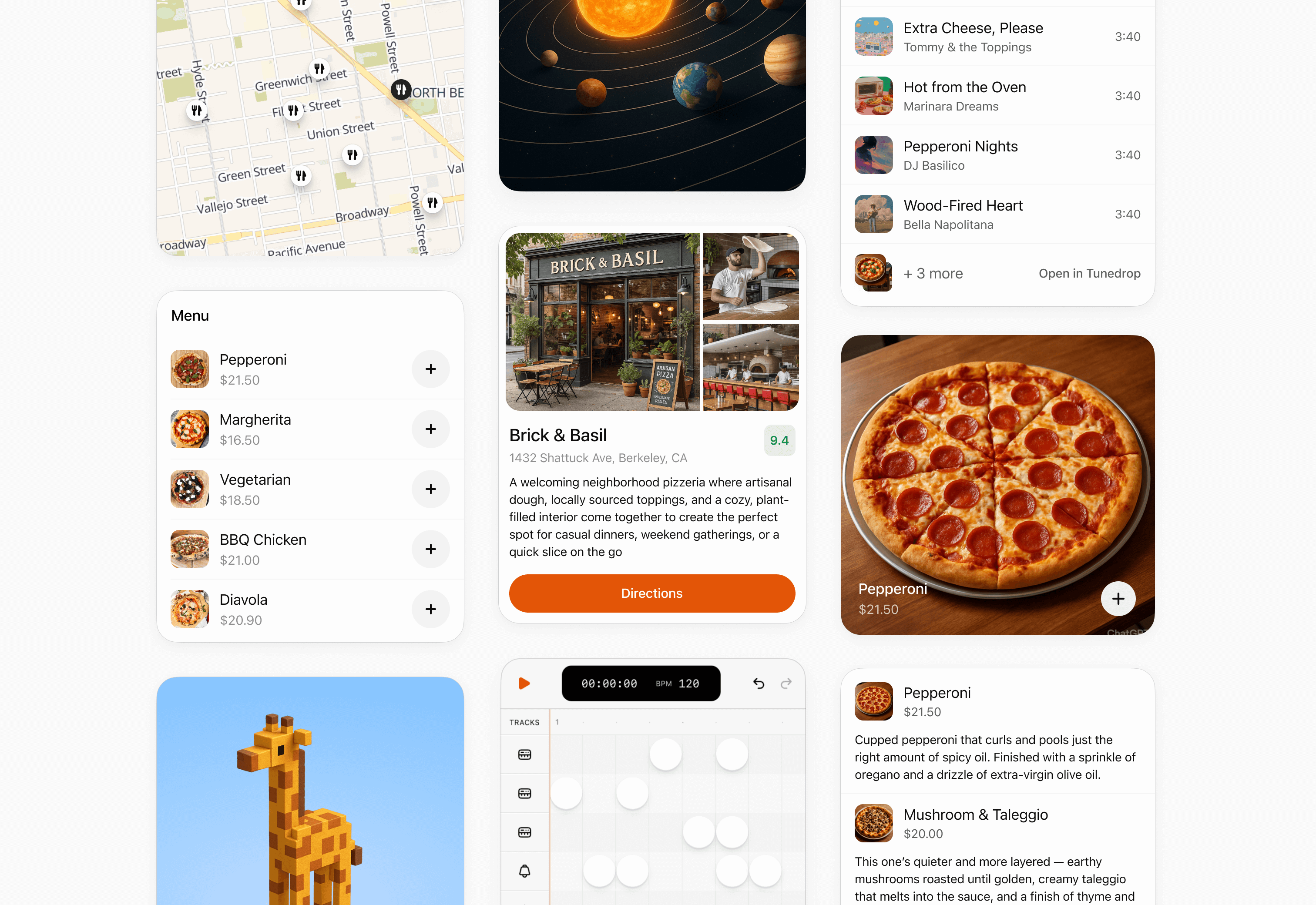
### Inline card
Use an inline card for a focused result, confirmation, or small set of actions. Keep it self-contained and avoid deep navigation.
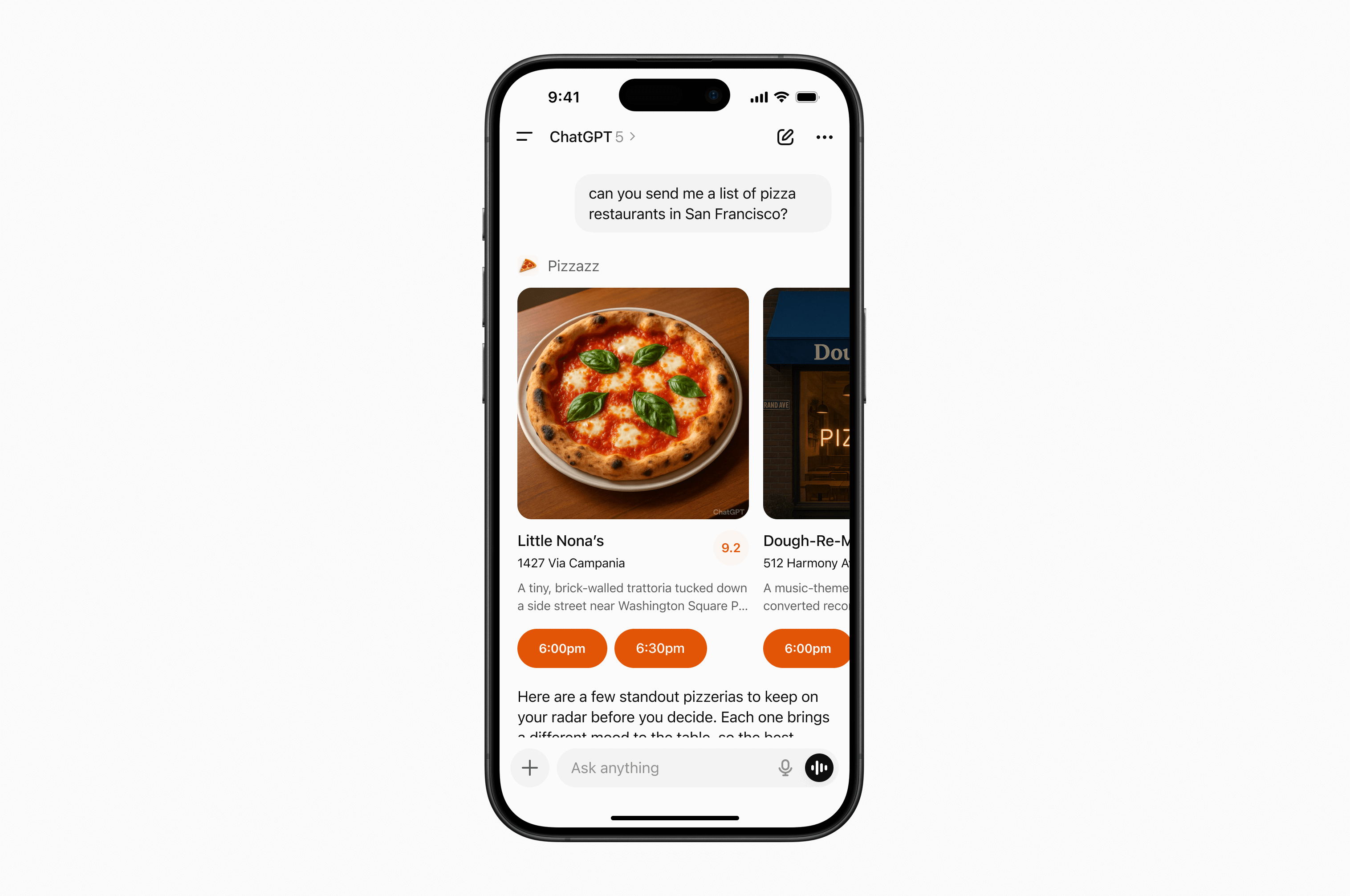
### Inline carousel
Use an inline carousel when people need to scan and choose from a small set of similar, visually rich options.
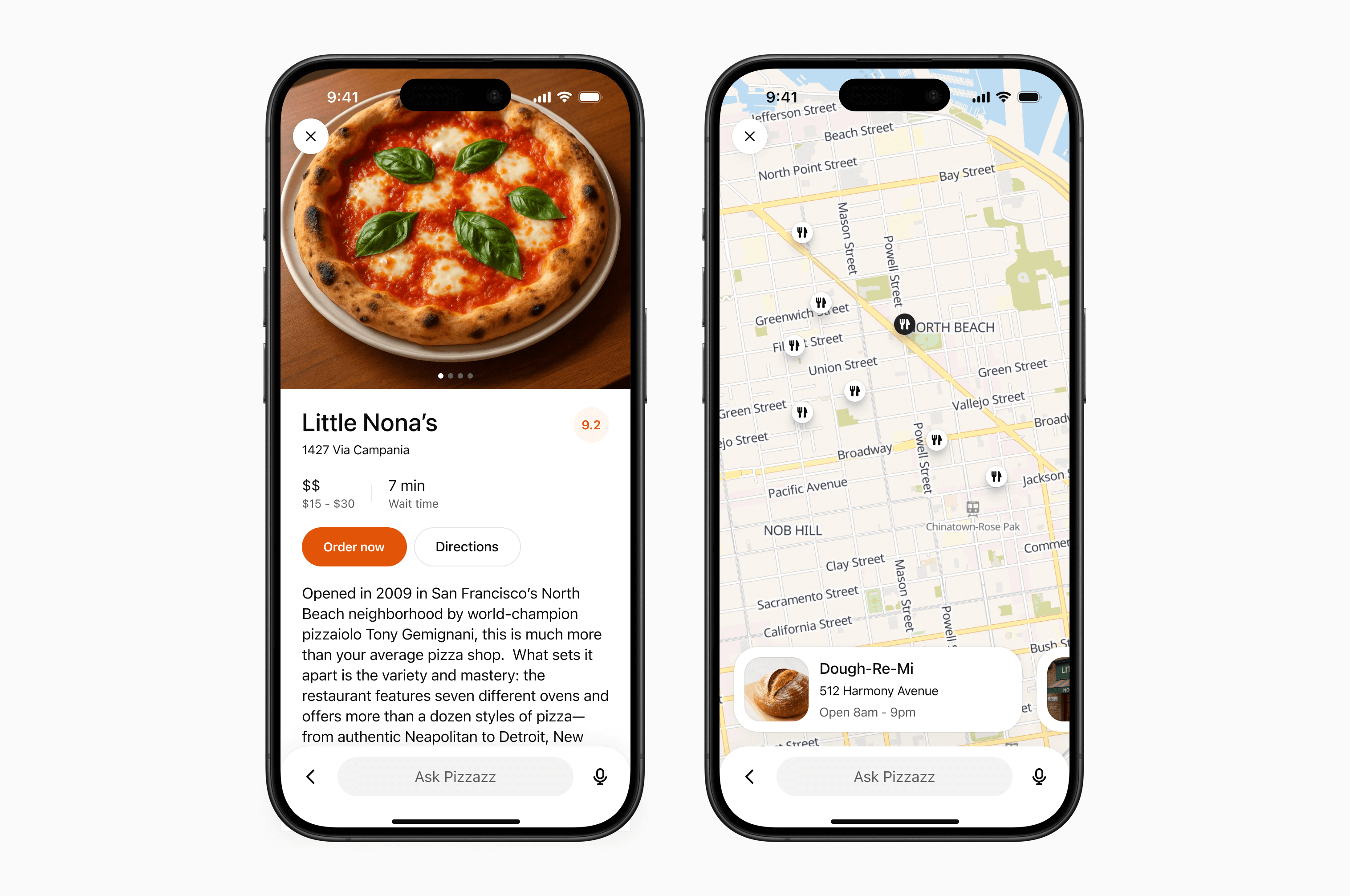
### fullscreen
Use fullscreen for rich tasks that need more room, such as maps, editing canvases, or detailed browsing. Design the experience to work with ChatGPT’s composer, which remains available in fullscreen.
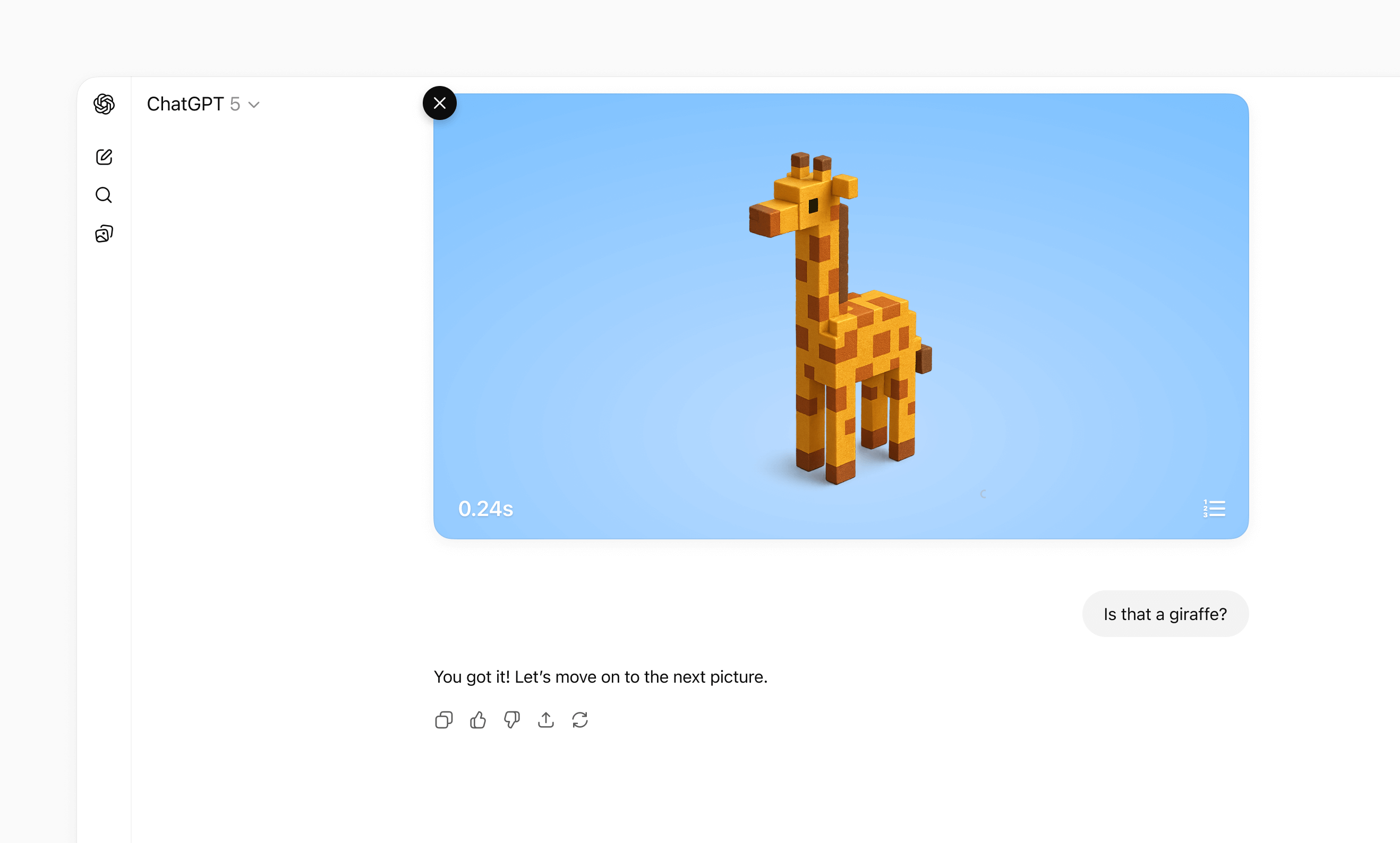
### Picture-in-picture
Use picture-in-picture for an ongoing activity that should remain visible while the conversation continues, such as a live session, game, or video.
For detailed layout, interaction, visual design, and accessibility guidance, see [UI guidelines](https://developers.openai.com/plugins/concepts/ui-guidelines).
## Separate data processing from UI rendering
### Decoupled pattern
If you attach a widget template to every tool call, ChatGPT can re-render your iframe too often. A better pattern is to separate data-processing tools from render tools:
* **Data tools** fetch, compute, or mutate data and return only tool results.
* **Render tools** take final data and return the widget template.
This allows the model to apply its intelligence to data it fetched before choosing to render UI to the user, making it much more likely that it will accomplish the user’s specific expressed goal.
This pattern is part of the MCP Apps architecture.
In practice, many UI integrations use this split:
* **Search/fetch tools (data-first):** Return IDs plus metadata with no widget template attached.
* **Render tools (for example, `render_listings_widget`):** Take a prepared list of IDs and render the widget.
Only the render tool should include `_meta.ui.resourceUri`.
### Decoupled call flow
Recommended call flow:
1. The model calls the data tool (for example, `roll_dice`).
2. The model receives `structuredContent` from the data tool.
3. The model calls the render tool with that data.
4. The widget renders once with final, model-checked context.
### Example: Real estate follow-up queries
Suppose your plugin shows listing cards and a map, but your server-side `search` tool only supports broad filters (city, price, beds, baths) and cannot filter by school zone.
If a user asks, “Which of these are in the Richmond Primary School zone?” decoupling helps:
1. `search` runs broadly and returns candidate listing IDs plus metadata.
2. The model refines that candidate set for the follow-up question.
3. The model calls `render_listings_widget` with only the filtered IDs.
4. The widget renders the final filtered set.
Best practices:
* Keep data tools reusable. Return complete `structuredContent` for chaining.
* Keep render tools focused on presentation. Don’t mix business logic into the render handler.
* State the dependency in the render tool description (for example, “Always call `roll_dice` first”).
* Keep reruns intentional. Let the UI call data tools directly for local interactions like “Re-roll,” without remounting the widget.
### Decoupled example
Example (decoupled dice tools):
```
import { McpServer } from "@modelcontextprotocol/sdk/server/mcp.js";
import { z } from "zod/v3";
const TEMPLATE_URI = "ui://widget/dice.html";
const server = new McpServer(
{ name: "Decoupled dice", version: "1.0.0" },
{ capabilities: { tools: {} } }
);
// The widget only renders the latest tool result.
// Re-roll calls the data tool directly to avoid remounting the widget.
const widgetHtml = `
Result: —
`.trim();
server.registerResource("dice-widget", TEMPLATE_URI, {}, async () => ({
contents: [
{
uri: TEMPLATE_URI,
mimeType: "text/html;profile=mcp-app",
text: widgetHtml,
_meta: { ui: { prefersBorder: true } },
},
],
}));
// 1) Data tool: no output template, returns chainable structuredContent.
server.registerTool(
"roll_dice",
{
title: "Roll dice",
description: "Roll an N-sided die and return { sides, value }.",
inputSchema: { sides: z.number().int().min(2) },
outputSchema: {
sides: z.number().int().min(2),
value: z.number().int().min(1),
},
_meta: {
"openai/toolInvocation/invoking": "Rolling…",
"openai/toolInvocation/invoked": "Rolled.",
},
},
async ({ sides }) => {
const value = 1 + Math.floor(Math.random() * sides);
return {
structuredContent: { sides, value },
content: [{ type: "text", text: `Rolled ${value} on ${sides} sides.` }],
};
}
);
// 2) Render tool: owns the template and requires data from roll_dice.
server.registerTool(
"render_dice_widget",
{
title: "Render dice widget",
description:
"Render the dice widget from roll data. First call roll_dice, then pass its sides and value to this tool.",
inputSchema: {
sides: z.number().int().min(2),
value: z.number().int().min(1),
},
outputSchema: {
sides: z.number().int().min(2),
value: z.number().int().min(1),
},
_meta: {
ui: { resourceUri: TEMPLATE_URI },
"openai/toolInvocation/invoking": "Rendering…",
"openai/toolInvocation/invoked": "Rendered.",
},
},
async ({ sides, value }) => ({
structuredContent: { sides, value },
content: [
{
type: "text",
text: `Showing a ${sides}-sided roll: ${value}.`,
},
],
})
);
export default server;
```
## Manage state
UI from an MCP server works with three kinds of state:
| State type | Owner | Lifetime | Examples |
| --- | --- | --- | --- |
| **Business data (authoritative)** | MCP server or external service | Long-lived | Tasks, tickets, documents |
| **UI state (ephemeral)** | UI instance | Active UI instance | Selected row, expanded panel, sort order |
| **Cross-session state (durable)** | Storage you control | Cross-session and cross-conversation | Saved filters, view mode, workspace |
Keep each value with the system that owns it. The UI should render authoritative data from tool results and layer temporary presentation state on top.
```
MCP server or external service
│
├── Authoritative business data
│
▼
UI
│
├── Ephemeral presentation state
│
└── Rendered view = business data + UI state
```
### Keep business data on the server
Business data is the source of truth. Do not store it only in the UI. When a user takes an action:
1. The UI calls an MCP tool.
2. The server validates the request and updates the data.
3. The server returns the updated authoritative snapshot.
4. The UI renders the snapshot while preserving compatible presentation state.
Return enough structured content for both the model and UI to understand the new state. This also lets the conversation remain useful if the UI cannot load.
### Keep temporary UI state in the UI
Use framework state for values that only affect presentation, such as a selected item, open panel, or draft filter. Each rendered UI instance has its own state.
When the model needs to know about a selection or staged edit, send that information through `ui/update-model-context`. This is the portable MCP Apps mechanism for updating model-visible context.
ChatGPT also provides optional widget-scoped persistence:
* Read the current snapshot from `window.openai.widgetState`.
* Write a new snapshot with `window.openai.setWidgetState(state)`.
`setWidgetState` is synchronous. Call it after each meaningful UI-state change; there is nothing to `await`.
```
import { useState } from "react";
export function TaskList({ tasks }) {
const [state, setState] = useState(
window.openai?.widgetState ?? { selectedId: null }
);
function selectTask(selectedId) {
const nextState = { ...state, selectedId };
setState(nextState);
window.openai?.setWidgetState?.(nextState);
}
return (
{tasks.map((task) => (
))}
);
}
```
Widget state belongs to one rendered UI instance. Do not use it as the source of truth for business data or as durable storage.
#### Make images visible to the model
For UI that works with images, use the structured widget-state shape:
* `modelContent`: Text or JSON the model should see.
* `privateContent`: UI-only state the model should not see.
* `imageIds`: File IDs the model should receive on later turns.
```
window.openai.setWidgetState({
modelContent: "Review the currently selected images.",
privateContent: {
currentView: "image-viewer",
filters: ["crop", "sharpen"],
},
imageIds: ["file_123", "file_456"],
});
```
Only include file IDs uploaded with `window.openai.uploadFile`, selected with `window.openai.selectFiles`, received through tool input file parameters, or returned through tool result file references.
### Store cross-session state on your server
Store preferences and data that must survive across conversations, devices, or sessions in storage you control. Authenticate the user so the MCP server can map each request to the correct account.
When you add durable storage:
* Keep latency low enough for interactive UI.
* Protect private data with server-side authorization.
* Plan for data residency and compliance requirements.
* Apply rate limits to traffic from retries or concurrent UI instances.
* Version stored objects so you can migrate them without breaking existing conversations.
Avoid `localStorage` for core state. UI runs in an isolated iframe, and browser storage does not provide a reliable cross-device or cross-session data layer.
## Scaffold the component project
Now that you understand the MCP Apps bridge (and optional ChatGPT extensions), it’s time to scaffold your component project.
As best practice, keep the component code separate from your server logic. A common layout is:
```
plugin-ui/
server/ # MCP server (Python or Node)
web/ # Component bundle source
package.json
tsconfig.json
src/component.tsx
dist/component.js # Build output
```
Create the project and install dependencies (Node 18+ recommended):
```
cd plugin-ui/web
npm init -y
npm install react@^18 react-dom@^18
npm install -D typescript esbuild
```
If your component requires drag-and-drop, charts, or other libraries, add them now. Keep the dependency set lean to reduce bundle size.
## Author the React component
Your entry file should mount a component into a `root` element and render from the latest tool result delivered over the MCP Apps bridge (for example, `ui/notifications/tool-result`).
The [examples page](https://developers.openai.com/plugins/build/examples) includes sample UI, such as the Pizzaz list of pizza restaurants.
### Explore the Pizzaz component gallery
The [UI examples](https://developers.openai.com/plugins/build/examples) include example components. Treat them as blueprints when shaping your own UI:
* **Pizzaz List:** Ranked card list with favorites and call-to-action buttons.
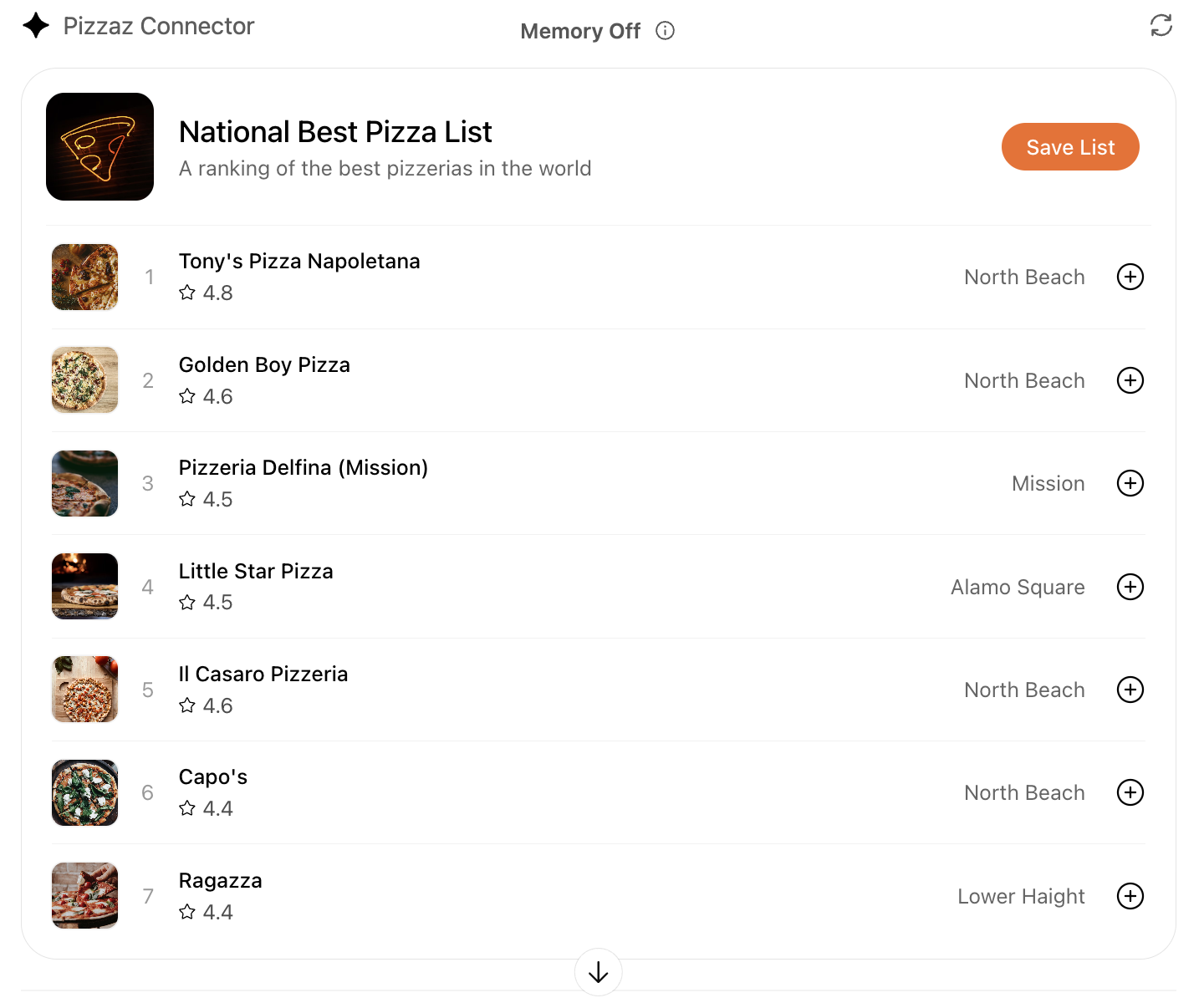
* **Pizzaz Carousel:** Embla-powered horizontal scroller that demonstrates media-heavy layouts.
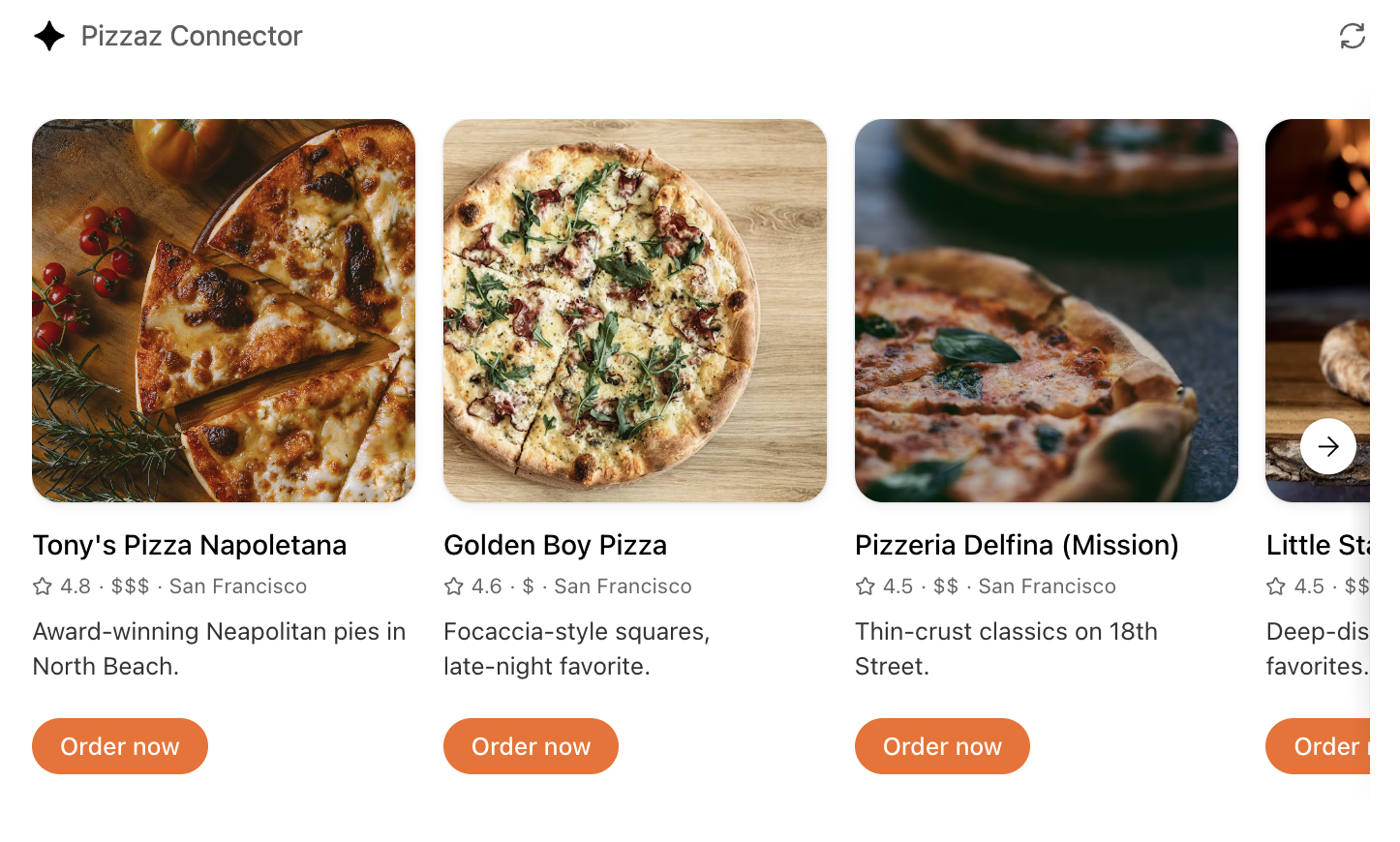
* **Pizzaz Map:** Mapbox integration with fullscreen inspector and host state sync.
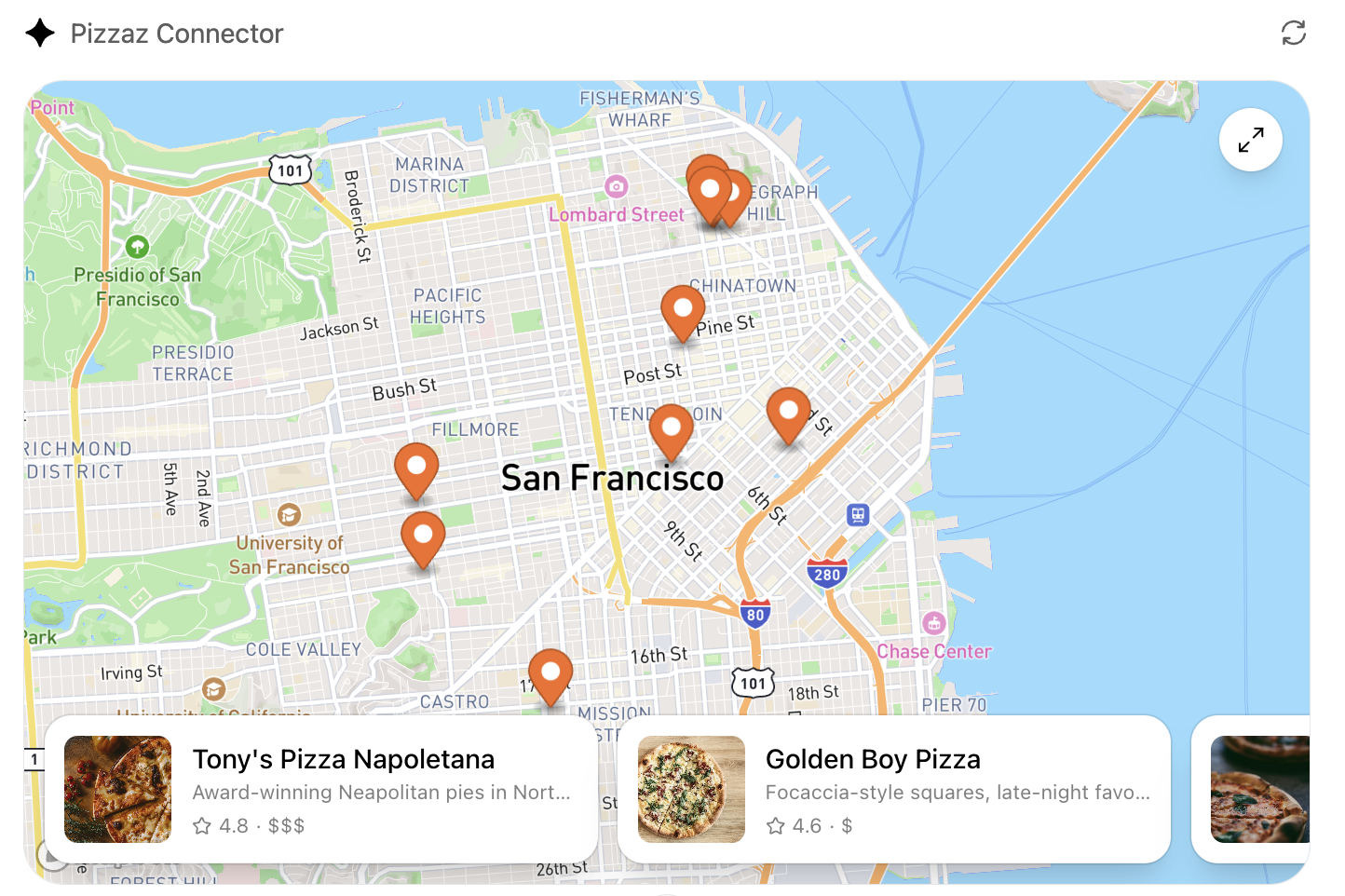
* **Pizzaz Album:** Stacked gallery view built for deep dives on a single place.
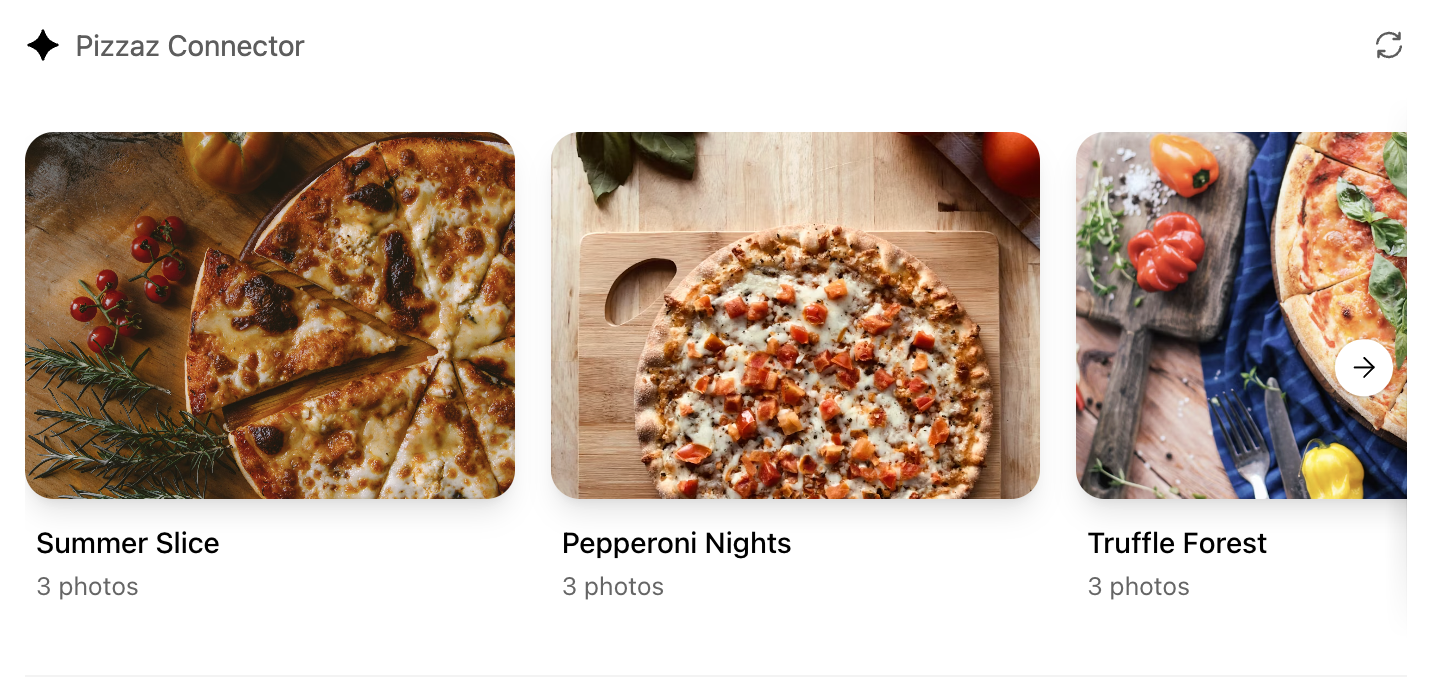
* **Pizzaz Video:** Scripted player with overlays and fullscreen controls.
Each example shows how to bundle assets, wire host APIs, and structure state for real conversations. Copy the one closest to your use case and adapt the data layer for your tool responses.
### React helper hooks
A small helper to subscribe to `ui/notifications/tool-result`:
```
type ToolResult = { structuredContent?: unknown } | null;
export function useToolResult() {
const [toolResult, setToolResult] = useState(null);
useEffect(() => {
const onMessage = (event: MessageEvent) => {
if (event.source !== window.parent) return;
const message = event.data;
if (!message || message.jsonrpc !== "2.0") return;
if (message.method !== "ui/notifications/tool-result") return;
setToolResult(message.params ?? null);
};
window.addEventListener("message", onMessage, { passive: true });
return () => window.removeEventListener("message", onMessage);
}, []);
return toolResult;
}
```
Render from `toolResult?.structuredContent`, and treat it as untrusted input.
## Widget localization
The host mirrors the locale to `document.documentElement.lang`. Use that locale to load translations and format dates/numbers. A common pattern with `react-intl`:
```
import { IntlProvider } from "react-intl";
import en from "./locales/en-US.json";
import es from "./locales/es-ES.json";
const messages: Record> = {
"en-US": en,
"es-ES": es,
};
export function PluginUI() {
const locale = document.documentElement.lang || "en-US";
return (
{/* Render UI with or useIntl() */}
);
}
```
## Bundle for the iframe
Once you finish writing your React component, you can build it into a single JavaScript module that the server can inline:
```
// package.json
{
"scripts": {
"build": "esbuild src/component.tsx --bundle --format=esm --outfile=dist/component.js"
}
}
```
Run `npm run build` to produce `dist/component.js`. If esbuild complains about missing dependencies, confirm you ran `npm install` in the `web/` directory and that your imports match installed package names (for example, `@react-dnd/html5-server-side` vs `react-dnd-html5-server-side`).
## Embed the component in the server response
Expose the component as an MCP resource with the MCP Apps UI MIME type (`text/html;profile=mcp-app`). If you use `@modelcontextprotocol/ext-apps/server`, prefer `RESOURCE_MIME_TYPE` instead of embedding the string:
```
import {
registerAppResource,
RESOURCE_MIME_TYPE,
} from "@modelcontextprotocol/ext-apps/server";
import { readFileSync } from "node:fs";
const component = readFileSync("web/dist/component.js", "utf8");
registerAppResource(
server,
"project-board",
"ui://project-board/v1.html",
{},
async () => ({
contents: [
{
uri: "ui://project-board/v1.html",
mimeType: RESOURCE_MIME_TYPE,
text: ``,
_meta: {
ui: {
prefersBorder: true,
domain: "https://example.com",
csp: {
connectDomains: ["https://api.example.com"],
resourceDomains: ["https://static.example.com"],
},
},
},
},
],
})
);
```
Associate the resource URI with only the tools that should render the component. For broader MCP Apps compatibility, use `_meta.ui.resourceUri`. ChatGPT also honors `_meta["openai/outputTemplate"]` as a compatibility alias.
Treat the resource URI as a cache key. When you make a breaking change to the HTML, JavaScript, or CSS, publish a new URI and update every tool that references it.
### Content security policy (CSP)
Declare the exact domains the component connects to or loads resources from:
* `connectDomains` for API requests.
* `resourceDomains` for scripts, styles, images, and other assets.
* `frameDomains` only when the component must embed specific iframe origins.
Nested frames are blocked by default. Keep each allowlist as narrow as possible. The plugin review process checks the declared policy against the UI behavior.
Component UI templates are the recommended path for production.
During development you can rebuild the component bundle whenever your React code changes and hot-reload the server.
## Offer checkout in your UI
If you want to offer users the ability to check out through your plugin’s UI flows, use the component to present products, prices, terms, and payment choices before confirmation. Keep the underlying catalog and order tools useful without UI, then choose an external checkout flow or, when available, an embedded payment option.
### Use external checkout by default
External checkout is the recommended and generally available approach. Link from the component to a merchant-hosted checkout flow on your own domain, where you handle:
* Pricing and payment collection.
* Taxes, discounts, and fees.
* Shipping and fulfillment.
* Refunds, support, and compliance.
Current approval is limited to plugins for physical-goods purchases. Do not offer other commerce categories unless OpenAI has explicitly enabled them for your plugin.
### Use saved payment methods
For eligible physical-goods purchases, optional UI can let customers select a payment method they previously saved with your service. This flow can display eligible saved methods but cannot collect new payment credentials. Your MCP server processes the purchase and returns the authoritative order result.
### Use the ChatGPT payment sheet
Embedded checkout with the ChatGPT payment sheet is in private beta for select marketplaces and is not available to all developers or users.
For enabled integrations, `window.openai.requestCheckout` opens the ChatGPT payment sheet:
`const order = await window.openai.requestCheckout(checkoutSession);`
The checkout flow has four parts:
1. An MCP tool returns a checkout session in `structuredContent`.
2. The component displays the line items, totals, terms, and fulfillment choices.
3. The component calls `requestCheckout(checkoutSession)` after the user chooses to pay.
4. ChatGPT sends the selected payment token to the MCP server’s `complete_checkout` tool, which charges the payment method and returns the completed order.
The checkout session must include:
* A unique session ID.
* Line items and quantities.
* Totals in integer minor currency units.
* Payment-provider and merchant metadata.
* Required legal, privacy, refund, and support links.
Treat the server as the source of truth for prices and order status. Verify the payment token, make the operation idempotent, persist the order, and return an authoritative receipt. Never trust totals calculated only in the component.
Use `payment_mode: "test"` to exercise the end-to-end flow without moving real funds. Handle cancellation, declined payments, and payment-provider errors in the component.
For complete checkout-session fields, payment-provider behavior, the `complete_checkout` result shape, and delegated-payment requirements, see the [checkout API reference](https://developers.openai.com/plugins/build/monetization).
[Previous Build an MCP server](https://developers.openai.com/plugins/build/mcp-server)[Next Authenticate users](https://developers.openai.com/plugins/build/auth)
Ask AI
## Docs agent
Loading docs agent...