---
格式版本: 2
标题: "Microsoft Outlook Personal Email and Calendar | Microsoft 365"
原文链接: "https://www.microsoft.com/en-us/microsoft-365/outlook/email-and-calendar-software-microsoft-outlook"
发布日期: "2026-08-13"
发布时间校准状态: "found"
发布时间需复核: "否"
发布时间来源: "rule:scrape:strict_html_body"
发布时间证据: "last-modified: Thu, 13 Aug 2026 15:01:50 GMT"
发布时间校准原因: "规则确认唯一严格发布时间，来源 scrape:strict_html_body"
发布时间校准置信度: "high"
发布时间候选数量: 1
发布时间严格候选数量: 1
发布时间原页读取状态: "source template page reused from URL open"
发布时间未找到原因: ""
发布时间校准时间: "2026-08-13T23:03:55+08:00"
发布时间仲裁状态: "skipped"
发布时间仲裁尝试次数: 0
发布时间仲裁耗时毫秒: 0
发现时间: "2026-08-13T23:02:22+08:00"
入库时间: "2026-08-13T15:03:57.571Z"
来源平台: "固定入口"
搜索渠道: "fixed_url"
搜索词: "https://blogs.microsoft.com/"
匹配关键词:
  - "AI"
相关厂家:
  - "Microsoft"
相关专家:
  []
内容类型: "网页"
抓取工具: "CDP Render"
清洗工具: "CDP Text + Defuddle/Readability 正文提取"
原始附件:
  []
AI优质: "否"
AI打分: 10
AI分档: "非优质"
AI质检状态: "不通过"
AI打分理由: "页面为Microsoft Outlook产品介绍，与超节点、AI Rack、机柜级AI基础设施等主题完全无关，仅因厂商Microsoft命中。无技术细节、商业部署或专家观点，判定为无关入口页。"
AI质检模型: "ali-deepseek-v4-flash"
AI质检时间: "2026-08-13T23:05:19+08:00"
AI主题相关性: 0
AI来源权威性: 8
AI新颖性: 0
AI技术细节: 0
AI商业部署信号: 0
AI完整性: 2
采集批次: "2026年8月13日23点02分20秒"
采集批次ID: "20260813-230220-895"
去重键: "https://www.microsoft.com/en-us/microsoft-365/outlook/email-and-calendar-software-microsoft-outlook"
---

Learn how to create and edit within your Word, Excel, PowerPoint, and Outlook apps.

![](https://cdn-dynmedia-1.microsoft.com/is/image/microsoftcorp/free-productivity-apps-Background-CTA-Stacked?resMode=sharp2&op_usm=1.5,0.65,15,0&wid=3200&qlt=100&fit=constrain)

- ### Together in one place
	See everything you need to manage your day in one view. Easily stay on top of emails, calendars, contacts, and to-do lists—at home or on the go.
	![Screenshots of desktop and mobile screens displaying an Outlook inbox](https://cdn-dynmedia-1.microsoft.com/is/image/microsoftcorp/1032407-accordion-1.1-800x513?resMode=sharp2&op_usm=1.5,0.65,15,0&wid=2000&hei=1283&qlt=100&fmt=png-alpha&fit=constrain)
- ### Connect your accounts
	Access personal, work, or school emails in the Outlook app on desktop and mobile, including Outlook.com, Gmail, Yahoo!, iCloud, and other mail services.
	![A screenshot of email address on the Outlook login page](https://cdn-dynmedia-1.microsoft.com/is/image/microsoftcorp/1032407-accordion-1.2-800x513?resMode=sharp2&op_usm=1.5,0.65,15,0&wid=2000&hei=1283&qlt=100&fmt=png-alpha&fit=constrain)
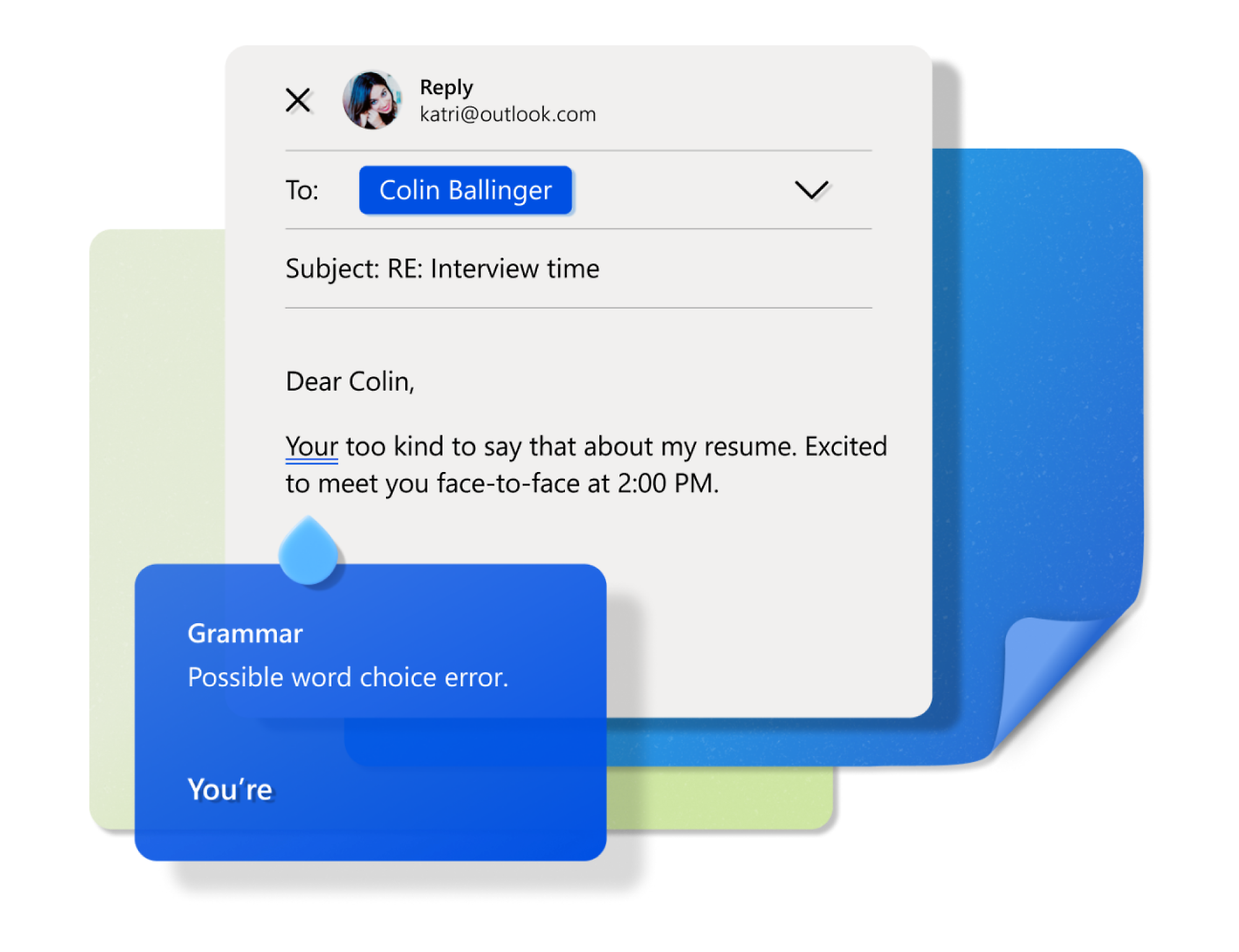
- ### Write more effective emails
	Help keep your sentences concise and polished with suggestions as you write, plus intelligent spelling and grammar checks.<sup><a aria-label="Footnote 3" href="#footnote-3">3</a></sup>
	![A screenshot of an email being composed using grammar check](https://cdn-dynmedia-1.microsoft.com/is/image/microsoftcorp/VerticalAccordion-1-3-656x504?resMode=sharp2&op_usm=1.5,0.65,15,0&wid=2000&hei=1537&qlt=100&fmt=png-alpha&fit=constrain)
- ### Easily access your files
	Quickly send, edit, or read a document on the go. Use Word, Excel, or PowerPoint from your inbox, and securely link to your OneDrive files.
	![A screenshot of an email with subject Camping permission slip](https://cdn-dynmedia-1.microsoft.com/is/image/microsoftcorp/1032407-accordion-1.4-800x513?resMode=sharp2&op_usm=1.5,0.65,15,0&wid=2000&hei=1283&qlt=100&fmt=png-alpha&fit=constrain)

[Back to tabs](#tabs-pill-bar-oc8375c_tab0-tab)

- ### Together in one place
	See everything you need to manage your day in one view. Easily stay on top of emails, calendars, contacts, and to-do lists—at home or on the go.
	![Screenshots of desktop and mobile screens displaying an Outlook inbox](https://cdn-dynmedia-1.microsoft.com/is/image/microsoftcorp/1032407-accordion-1.1-800x513?resMode=sharp2&op_usm=1.5,0.65,15,0&wid=2000&hei=1283&qlt=100&fmt=png-alpha&fit=constrain)
- ### Connect your accounts
	Access personal, work, or school emails in the Outlook app on desktop and mobile, including Outlook.com, Gmail, Yahoo!, iCloud, and other mail services.
	![A screenshot of email address on the Outlook login page](https://cdn-dynmedia-1.microsoft.com/is/image/microsoftcorp/1032407-accordion-1.2-800x513?resMode=sharp2&op_usm=1.5,0.65,15,0&wid=2000&hei=1283&qlt=100&fmt=png-alpha&fit=constrain)
- ### Write more effective emails
	Help keep your sentences concise and polished with suggestions as you write, plus intelligent spelling and grammar checks.<sup><a aria-label="Footnote 3" href="#footnote-3">3</a></sup>
	![A screenshot of an email being composed using grammar check](https://cdn-dynmedia-1.microsoft.com/is/image/microsoftcorp/VerticalAccordion-1-3-656x504?resMode=sharp2&op_usm=1.5,0.65,15,0&wid=2000&hei=1537&qlt=100&fmt=png-alpha&fit=constrain)
- ### Easily access your files
	Quickly send, edit, or read a document on the go. Use Word, Excel, or PowerPoint from your inbox, and securely link to your OneDrive files.
	![A screenshot of an email with subject Camping permission slip](https://cdn-dynmedia-1.microsoft.com/is/image/microsoftcorp/1032407-accordion-1.4-800x513?resMode=sharp2&op_usm=1.5,0.65,15,0&wid=2000&hei=1283&qlt=100&fmt=png-alpha&fit=constrain)

[Back to tabs](#tabs-pill-bar-oc8375a_tab0-tab)

- ### Together in one place
	See everything you need to manage your day in one view. Easily stay on top of emails, calendars, contacts, and to-do lists—at home or on the go.
	![Screenshots of desktop and mobile screens displaying an Outlook inbox](https://cdn-dynmedia-1.microsoft.com/is/image/microsoftcorp/1032407-accordion-1.1-800x513?resMode=sharp2&op_usm=1.5,0.65,15,0&wid=2000&hei=1283&qlt=100&fmt=png-alpha&fit=constrain)
- ### Connect your accounts
	Access personal, work, or school emails in the Outlook app on desktop and mobile, including Outlook.com, Gmail, Yahoo!, iCloud, and other mail services.
	![A screenshot of email address on the Outlook login page](https://cdn-dynmedia-1.microsoft.com/is/image/microsoftcorp/1032407-accordion-1.2-800x513?resMode=sharp2&op_usm=1.5,0.65,15,0&wid=2000&hei=1283&qlt=100&fmt=png-alpha&fit=constrain)
- ### Write more effective emails
	Help keep your sentences concise and polished with suggestions as you write, plus intelligent spelling and grammar checks.<sup><a aria-label="Footnote 3" href="#footnote-3">3</a></sup>
	![A screenshot of an email being composed using grammar check](https://cdn-dynmedia-1.microsoft.com/is/image/microsoftcorp/VerticalAccordion-1-3-656x504?resMode=sharp2&op_usm=1.5,0.65,15,0&wid=2000&hei=1537&qlt=100&fmt=png-alpha&fit=constrain)
- ### Easily access your files
	Quickly send, edit, or read a document on the go. Use Word, Excel, or PowerPoint from your inbox, and securely link to your OneDrive files.
	![A screenshot of an email with subject Camping permission slip](https://cdn-dynmedia-1.microsoft.com/is/image/microsoftcorp/1032407-accordion-1.4-800x513?resMode=sharp2&op_usm=1.5,0.65,15,0&wid=2000&hei=1283&qlt=100&fmt=png-alpha&fit=constrain)

[Back to tabs](#tabs-pill-bar-oc8375b_tab0-tab)

![](https://cdn-dynmedia-1.microsoft.com/is/image/microsoftcorp/Outlook-new-Interactive-Demo-Background-1600x999?resMode=sharp2&op_usm=1.5,0.65,15,0&wid=2000&hei=1249&qlt=100&fmt=png-alpha&fit=constrain)

Take the tour

## See Outlook in Action

Manage what’s important with Outlook. Whether it’s different email accounts, multiple calendars, or signing that form, Outlook has you covered - at home, for work, or on-the-go.

### From first thought to ready-to-send with Copilot

[Back to tabs](#tabs-ocbb5d_tab0-tab)

![](https://cdn-dynmedia-1.microsoft.com/is/image/microsoftcorp/free-productivity-apps-Background-FAQ?resMode=sharp2&op_usm=1.5,0.65,15,0&wid=3200&qlt=100&fit=constrain)

Featured resources

Showing 1-2 of 3 slides ![Less clutter, More clarity](https://cdn-dynmedia-1.microsoft.com/is/image/microsoftcorp/3442900-Resource-3-416x178?resMode=sharp2&op_usm=1.5,0.65,15,0&wid=1000&hei=429&qlt=100&fit=constrain)

Summarize 

### Get up to speed faster

Let Microsoft Copilot in Outlook summarize long email threads so you can get to the point quickly.

[Watch video](#modalvideo1)

![ Faster emails, Fewer errors](https://cdn-dynmedia-1.microsoft.com/is/image/microsoftcorp/3442900-Resource-2-416x178?resMode=sharp2&op_usm=1.5,0.65,15,0&wid=1000&hei=429&qlt=100&fit=constrain)

Draft

### Faster emails, fewer errors

Get your message right the first time with Microsoft Copilot in Outlook.

[Watch video](#modalvideo2)

Back to carousel navigation controls ![](https://cdn-dynmedia-1.microsoft.com/is/image/microsoftcorp/Outlook-new-SKU-Background-1600x936?resMode=sharp2&op_usm=1.5,0.65,15,0&wid=3200&qlt=100&fit=constrain)

Yearly

Monthly

### Outlook

Free

[Create a free account](https://go.microsoft.com/fwlink/p/?linkid=2125440&clcid=0x409&culture=en-us&country=us)

- For 1 person
- Outlook email and calendar on web, desktop, and mobile apps
- Core Outlook security features like spam filters
- 15 GB of mailbox storage
- 5 GB of  [cloud storage](https://go.microsoft.com/fwlink/?linkid=2255629)
- Web and mobile versions of Word, Excel, PowerPoint, OneNote, OneDrive and more apps

- ![](https://cdn-dynmedia-1.microsoft.com/is/image/microsoftcorp/263012-Safeguardyourfamily-Outlook-02-Icon-140x140?resMode=sharp2&op_usm=1.5,0.65,15,0&qlt=85)

- For 1 person
- Use on multiple devices at the same time
- Ad-free Outlook email and calendar on web, mobile, and desktop apps
- Advanced Outlook security features
- 100 GB of mailbox storage
- 100 GB of secure [cloud storage](https://go.microsoft.com/fwlink/?linkid=2255629)
- OneDrive ransomware protection for your photos and files
- Ongoing support for help when you need it

###### Apps with subscription value

- ![Outlook](https://www.microsoft.com/content/dam/microsoft/bade/images/icons/en-us/m365-app-icons-fy26/Outlook-Icon-FY26.svg)
- ![OneDrive](https://www.microsoft.com/content/dam/microsoft/bade/images/icons/en-us/m365-app-icons-fy26/OneDrive-Icon-FY26.svg)

- For 1 person
- Use on up to 5 devices simultaneously
- Works on PC, Mac, iPhone, iPad, and Android phones and tablets
- 1 TB (1000 GB) of secure cloud storage
- Word, Excel, PowerPoint, Outlook and OneNote desktop apps with Microsoft Copilot
- Higher usage than free for select Copilot features
- Use Copilot in select apps with work files in a secure way
- Higher usage for AI image creation and editing in Microsoft Designer, Photos, and Copilot chat
- Microsoft Defender advanced security for your identity, personal data, and devices
- OneDrive ransomware protection for your photos and files
- Microsoft Teams with Copilot to call, chat, and collaborate
- Ongoing support for help when you need it

###### Apps with subscription value

- ![Microsoft Copilot](https://www.microsoft.com/content/dam/microsoft/bade/images/icons/en-us/m365-app-icons-fy26/Copilot-Icon-FY26.svg)
- ![Word](https://www.microsoft.com/content/dam/microsoft/bade/images/icons/en-us/m365-app-icons-fy26/Word-Icon-FY26.svg)
- ![Excel](https://www.microsoft.com/content/dam/microsoft/bade/images/icons/en-us/m365-app-icons-fy26/Excel-Icon-FY26.svg)
- ![PowerPoint](https://www.microsoft.com/content/dam/microsoft/bade/images/icons/en-us/m365-app-icons-fy26/PowerPoint-Icon-FY26.svg)
- ![Outlook](https://www.microsoft.com/content/dam/microsoft/bade/images/icons/en-us/m365-app-icons-fy26/Outlook-Icon-FY26.svg)
- ![OneNote](https://www.microsoft.com/content/dam/microsoft/bade/images/icons/en-us/m365-app-icons-fy26/OneNote-Icon-FY26.svg)
- ![OneDrive](https://www.microsoft.com/content/dam/microsoft/bade/images/icons/en-us/m365-app-icons-fy26/OneDrive-Icon-FY26.svg)
- ![Microsoft Defender](https://www.microsoft.com/content/dam/microsoft/bade/images/icons/en-us/m365-app-icons-fy26/Defender-Icon-FY26.svg)
- ![Microsoft Teams](https://www.microsoft.com/content/dam/microsoft/bade/images/icons/en-us/m365-app-icons-fy26/Teams-Icon-FY26.svg)
- ![Designer](https://www.microsoft.com/content/dam/microsoft/bade/images/icons/en-us/m365-app-icons-fy26/Designer-Icon-FY26.svg)
- ![Clipchamp](https://www.microsoft.com/content/dam/microsoft/bade/images/icons/en-us/m365-app-icons-fy26/Clipchamp-Icon-FY26.svg)

- For 1 to 6 people (AI features for subscription owner only)
- Each person can use on up to 5 devices simultaneously
- Works on PC, Mac, iPhone, iPad, and Android phones and tablets
- Up to 6 TB of secure cloud storage (1 TB per person)
- Word, Excel, PowerPoint, Outlook and OneNote desktop apps with Microsoft Copilot
- Higher usage than free for select Copilot features
- Use Copilot in select apps with work files in a secure way
- Higher usage for AI image creation and editing in Microsoft Designer, Photos, and Copilot chat
- Microsoft Defender advanced security for your family’s identity, personal data, and devices
- OneDrive ransomware protection for your family’s photos and files
- Microsoft Teams with Copilot to call, chat, and collaborate
- Ongoing support for help when you and your family need it

- ![Microsoft Copilot](https://www.microsoft.com/content/dam/microsoft/bade/images/icons/en-us/m365-app-icons-fy26/Copilot-Icon-FY26.svg)
- ![Word](https://www.microsoft.com/content/dam/microsoft/bade/images/icons/en-us/m365-app-icons-fy26/Word-Icon-FY26.svg)
- ![Excel](https://www.microsoft.com/content/dam/microsoft/bade/images/icons/en-us/m365-app-icons-fy26/Excel-Icon-FY26.svg)
- ![PowerPoint](https://www.microsoft.com/content/dam/microsoft/bade/images/icons/en-us/m365-app-icons-fy26/PowerPoint-Icon-FY26.svg)
- ![Outlook](https://www.microsoft.com/content/dam/microsoft/bade/images/icons/en-us/m365-app-icons-fy26/Outlook-Icon-FY26.svg)
- ![OneNote](https://www.microsoft.com/content/dam/microsoft/bade/images/icons/en-us/m365-app-icons-fy26/OneNote-Icon-FY26.svg)
- ![OneDrive](https://www.microsoft.com/content/dam/microsoft/bade/images/icons/en-us/m365-app-icons-fy26/OneDrive-Icon-FY26.svg)
- ![Microsoft Defender](https://www.microsoft.com/content/dam/microsoft/bade/images/icons/en-us/m365-app-icons-fy26/Defender-Icon-FY26.svg)
- ![Microsoft Teams](https://www.microsoft.com/content/dam/microsoft/bade/images/icons/en-us/m365-app-icons-fy26/Teams-Icon-FY26.svg)
- ![Designer](https://www.microsoft.com/content/dam/microsoft/bade/images/icons/en-us/m365-app-icons-fy26/Designer-Icon-FY26.svg)
- ![Clipchamp](https://www.microsoft.com/content/dam/microsoft/bade/images/icons/en-us/m365-app-icons-fy26/Clipchamp-Icon-FY26.svg)